
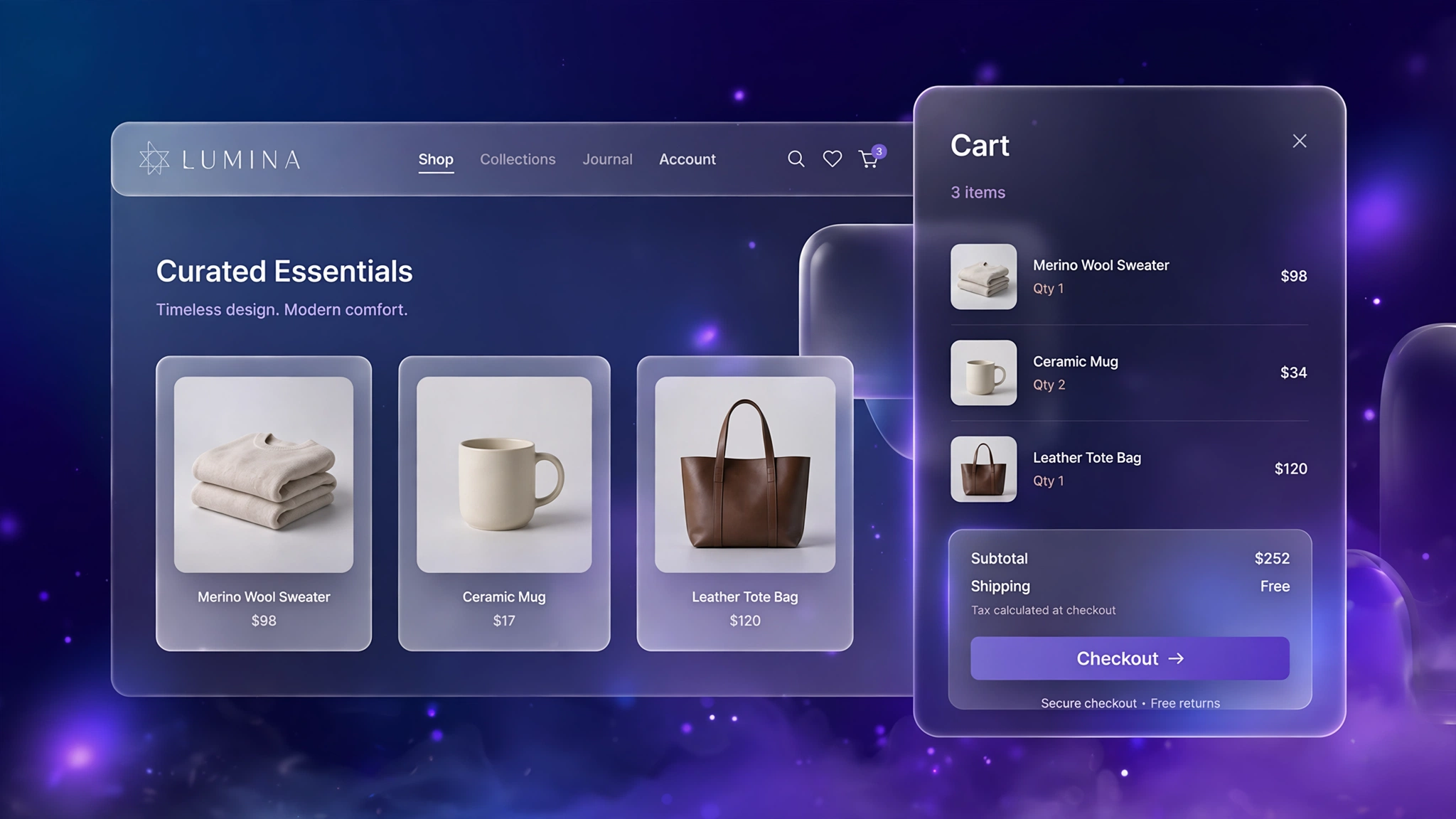
The cart drawer — that panel that slides in from the side when someone adds a product — is prime conversion real estate. A well-designed drawer keeps shoppers in the flow instead of yanking them to a separate cart page, and it is the perfect spot for upsells and trust signals. Most premium themes charge extra for a good one, but you can build your own with Liquid and a little vanilla JS. Below are 6 drawer designs for different store vibes. Pick one, paste it into a Custom Liquid section in your header group, and give your store an instant premium feel — no app, no monthly fee.
1. Fashion Store – Dark Slide Drawer
A moody dark drawer for apparel brands — product shots pop against the charcoal background and the whole thing screams premium streetwear.
Preview
Sample: Slide-out drawer with 2 items, quantity steppers and a checkout button — opens without a page reload.
Liquid Code
{% comment %} LayoutKart - Cart Drawer (Fashion Dark) {% endcomment %}
{% assign fs_threshold = 99900 %}
<style>
.lk-drawer-d1{position:fixed;top:0;right:0;height:100dvh;width:min(420px,92vw);z-index:9999;
transform:translateX(105%);transition:transform .35s ease;display:flex;flex-direction:column;
background:#141414;border-left:1px solid #2a2a2a;border-radius:14px 0 0 14px;box-shadow:-12px 0 40px rgba(0,0,0,.18);}
.lk-drawer-d1.open{transform:translateX(0);}
.lk-drawer-d1 header{display:flex;justify-content:space-between;align-items:center;
padding:16px 20px;border-bottom:1px solid rgba(0,0,0,.08);}
.lk-drawer-d1 header h3{margin:0;font-size:18px;}
.lk-drawer-d1 .lk-close{background:none;border:none;font-size:24px;cursor:pointer;line-height:1;}
.lk-drawer-d1 .lk-items{flex:1;overflow-y:auto;padding:12px 20px;}
.lk-drawer-d1 .lk-item{display:flex;gap:12px;padding:12px 0;border-bottom:1px dashed rgba(0,0,0,.1);}
.lk-drawer-d1 .lk-item img{width:64px;height:64px;object-fit:cover;border-radius:8px;}
.lk-drawer-d1 .lk-qty{display:flex;align-items:center;gap:8px;margin-top:6px;}
.lk-drawer-d1 .lk-qty button{width:26px;height:26px;border-radius:50%;border:1px solid #ccc;
background:#fff;cursor:pointer;font-size:14px;}
.lk-drawer-d1 footer{padding:16px 20px;border-top:1px solid rgba(0,0,0,.08);}
.lk-drawer-d1 .lk-sub{display:flex;justify-content:space-between;font-weight:700;margin:8px 0 12px;}
.lk-drawer-d1 .lk-checkout{display:block;text-align:center;padding:14px;border-radius:10px;
background:#ff4d6d;color:#ffffff;font-weight:700;text-decoration:none;}
.lk-overlay-d1{position:fixed;inset:0;background:rgba(0,0,0,.45);z-index:9998;display:none;}
.lk-overlay-d1.show{display:block;}
</style>
<div class="lk-overlay-d1" id="lkOverlayd1" onclick="closeCartd1()"></div>
<aside class="lk-drawer-d1" id="lkDrawerd1" aria-label="Shopping cart">
<header><h3>Your Cart (<span id="lkCountd1">{{ cart.item_count }}</span>)</h3>
<button class="lk-close" onclick="closeCartd1()" aria-label="Close">×</button></header>
<div class="lk-items">
{% for item in cart.items %}
<div class="lk-item">
<img src="{{ item.image | image_url: width: 128 }}" alt="{{ item.title | escape }}" loading="lazy">
<div>
<strong>{{ item.product.title }}</strong>
<div style="font-size:13px;opacity:.7;">{{ item.variant.title }}</div>
<div class="lk-qty">
<button onclick="chQtyd1('{{ item.key }}',{{ item.quantity | minus: 1 }})">−</button>
<span>{{ item.quantity }}</span>
<button onclick="chQtyd1('{{ item.key }}',{{ item.quantity | plus: 1 }})">+</button>
</div>
<div style="font-weight:700;margin-top:4px;">{{ item.final_line_price | money }}</div>
</div>
</div>
{% else %}
<p style="text-align:center;opacity:.6;padding:40px 0;">Your cart is empty.</p>
{% endfor %}
</div>
<footer>
<div class="lk-sub"><span>Subtotal</span><span>{{ cart.total_price | money }}</span></div>
<a class="lk-checkout" href="/checkout">Checkout →</a>
<p style="font-size:12px;text-align:center;opacity:.6;">Shipping & taxes calculated at checkout</p>
</footer>
</aside>
<script>
function openCartd1(){document.getElementById('lkDrawerd1').classList.add('open');
document.getElementById('lkOverlayd1').classList.add('show');}
function closeCartd1(){document.getElementById('lkDrawerd1').classList.remove('open');
document.getElementById('lkOverlayd1').classList.remove('show');}
function chQtyd1(key,qty){
fetch('/cart/change.js',{method:'POST',headers:{'Content-Type':'application/json'},
body:JSON.stringify({id:key,quantity:qty})}).then(r=>r.json()).then(()=>location.reload());}
</script>2. Minimal – Clean White Drawer
Crisp white, generous spacing, zero clutter. For Scandinavian-style minimal brands where the drawer should feel invisible.
Preview
Sample: Slide-out drawer with 2 items, quantity steppers and a checkout button — opens without a page reload.
Liquid Code
{% comment %} LayoutKart - Cart Drawer (Minimal White) {% endcomment %}
{% assign fs_threshold = 99900 %}
<style>
.lk-drawer-d2{position:fixed;top:0;right:0;height:100dvh;width:min(420px,92vw);z-index:9999;
transform:translateX(105%);transition:transform .35s ease;display:flex;flex-direction:column;
background:#ffffff;border-left:1px solid #e5e5e5;border-radius:0px 0 0 0px;box-shadow:-12px 0 40px rgba(0,0,0,.18);}
.lk-drawer-d2.open{transform:translateX(0);}
.lk-drawer-d2 header{display:flex;justify-content:space-between;align-items:center;
padding:16px 20px;border-bottom:1px solid rgba(0,0,0,.08);}
.lk-drawer-d2 header h3{margin:0;font-size:18px;}
.lk-drawer-d2 .lk-close{background:none;border:none;font-size:24px;cursor:pointer;line-height:1;}
.lk-drawer-d2 .lk-items{flex:1;overflow-y:auto;padding:12px 20px;}
.lk-drawer-d2 .lk-item{display:flex;gap:12px;padding:12px 0;border-bottom:1px dashed rgba(0,0,0,.1);}
.lk-drawer-d2 .lk-item img{width:64px;height:64px;object-fit:cover;border-radius:8px;}
.lk-drawer-d2 .lk-qty{display:flex;align-items:center;gap:8px;margin-top:6px;}
.lk-drawer-d2 .lk-qty button{width:26px;height:26px;border-radius:50%;border:1px solid #ccc;
background:#fff;cursor:pointer;font-size:14px;}
.lk-drawer-d2 footer{padding:16px 20px;border-top:1px solid rgba(0,0,0,.08);}
.lk-drawer-d2 .lk-sub{display:flex;justify-content:space-between;font-weight:700;margin:8px 0 12px;}
.lk-drawer-d2 .lk-checkout{display:block;text-align:center;padding:14px;border-radius:10px;
background:#111111;color:#ffffff;font-weight:700;text-decoration:none;}
.lk-overlay-d2{position:fixed;inset:0;background:rgba(0,0,0,.45);z-index:9998;display:none;}
.lk-overlay-d2.show{display:block;}
</style>
<div class="lk-overlay-d2" id="lkOverlayd2" onclick="closeCartd2()"></div>
<aside class="lk-drawer-d2" id="lkDrawerd2" aria-label="Shopping cart">
<header><h3>Your Cart (<span id="lkCountd2">{{ cart.item_count }}</span>)</h3>
<button class="lk-close" onclick="closeCartd2()" aria-label="Close">×</button></header>
<div class="lk-items">
{% for item in cart.items %}
<div class="lk-item">
<img src="{{ item.image | image_url: width: 128 }}" alt="{{ item.title | escape }}" loading="lazy">
<div>
<strong>{{ item.product.title }}</strong>
<div style="font-size:13px;opacity:.7;">{{ item.variant.title }}</div>
<div class="lk-qty">
<button onclick="chQtyd2('{{ item.key }}',{{ item.quantity | minus: 1 }})">−</button>
<span>{{ item.quantity }}</span>
<button onclick="chQtyd2('{{ item.key }}',{{ item.quantity | plus: 1 }})">+</button>
</div>
<div style="font-weight:700;margin-top:4px;">{{ item.final_line_price | money }}</div>
</div>
</div>
{% else %}
<p style="text-align:center;opacity:.6;padding:40px 0;">Your cart is empty.</p>
{% endfor %}
</div>
<footer>
<div class="lk-sub"><span>Subtotal</span><span>{{ cart.total_price | money }}</span></div>
<a class="lk-checkout" href="/checkout">Checkout →</a>
<p style="font-size:12px;text-align:center;opacity:.6;">Shipping & taxes calculated at checkout</p>
</footer>
</aside>
<script>
function openCartd2(){document.getElementById('lkDrawerd2').classList.add('open');
document.getElementById('lkOverlayd2').classList.add('show');}
function closeCartd2(){document.getElementById('lkDrawerd2').classList.remove('open');
document.getElementById('lkOverlayd2').classList.remove('show');}
function chQtyd2(key,qty){
fetch('/cart/change.js',{method:'POST',headers:{'Content-Type':'application/json'},
body:JSON.stringify({id:key,quantity:qty})}).then(r=>r.json()).then(()=>location.reload());}
</script>3. Beauty – Blush Pink Drawer
Soft blush tones for cosmetics — the drawer feels like an extension of a beauty counter, gentle and inviting.
Preview
Sample: Slide-out drawer with 2 items, quantity steppers and a checkout button — opens without a page reload.
Liquid Code
{% comment %} LayoutKart - Cart Drawer (Beauty Blush) {% endcomment %}
{% assign fs_threshold = 79900 %}
<style>
.lk-drawer-d3{position:fixed;top:0;right:0;height:100dvh;width:min(420px,92vw);z-index:9999;
transform:translateX(105%);transition:transform .35s ease;display:flex;flex-direction:column;
background:#fdf2f8;border-left:1px solid #f9a8d4;border-radius:18px 0 0 18px;box-shadow:-12px 0 40px rgba(0,0,0,.18);}
.lk-drawer-d3.open{transform:translateX(0);}
.lk-drawer-d3 header{display:flex;justify-content:space-between;align-items:center;
padding:16px 20px;border-bottom:1px solid rgba(0,0,0,.08);}
.lk-drawer-d3 header h3{margin:0;font-size:18px;}
.lk-drawer-d3 .lk-close{background:none;border:none;font-size:24px;cursor:pointer;line-height:1;}
.lk-drawer-d3 .lk-items{flex:1;overflow-y:auto;padding:12px 20px;}
.lk-drawer-d3 .lk-item{display:flex;gap:12px;padding:12px 0;border-bottom:1px dashed rgba(0,0,0,.1);}
.lk-drawer-d3 .lk-item img{width:64px;height:64px;object-fit:cover;border-radius:8px;}
.lk-drawer-d3 .lk-qty{display:flex;align-items:center;gap:8px;margin-top:6px;}
.lk-drawer-d3 .lk-qty button{width:26px;height:26px;border-radius:50%;border:1px solid #ccc;
background:#fff;cursor:pointer;font-size:14px;}
.lk-drawer-d3 footer{padding:16px 20px;border-top:1px solid rgba(0,0,0,.08);}
.lk-drawer-d3 .lk-sub{display:flex;justify-content:space-between;font-weight:700;margin:8px 0 12px;}
.lk-drawer-d3 .lk-checkout{display:block;text-align:center;padding:14px;border-radius:10px;
background:#ec4899;color:#ffffff;font-weight:700;text-decoration:none;}
.lk-overlay-d3{position:fixed;inset:0;background:rgba(0,0,0,.45);z-index:9998;display:none;}
.lk-overlay-d3.show{display:block;}
</style>
<div class="lk-overlay-d3" id="lkOverlayd3" onclick="closeCartd3()"></div>
<aside class="lk-drawer-d3" id="lkDrawerd3" aria-label="Shopping cart">
<header><h3>Your Cart (<span id="lkCountd3">{{ cart.item_count }}</span>)</h3>
<button class="lk-close" onclick="closeCartd3()" aria-label="Close">×</button></header>
<div class="lk-items">
{% for item in cart.items %}
<div class="lk-item">
<img src="{{ item.image | image_url: width: 128 }}" alt="{{ item.title | escape }}" loading="lazy">
<div>
<strong>{{ item.product.title }}</strong>
<div style="font-size:13px;opacity:.7;">{{ item.variant.title }}</div>
<div class="lk-qty">
<button onclick="chQtyd3('{{ item.key }}',{{ item.quantity | minus: 1 }})">−</button>
<span>{{ item.quantity }}</span>
<button onclick="chQtyd3('{{ item.key }}',{{ item.quantity | plus: 1 }})">+</button>
</div>
<div style="font-weight:700;margin-top:4px;">{{ item.final_line_price | money }}</div>
</div>
</div>
{% else %}
<p style="text-align:center;opacity:.6;padding:40px 0;">Your cart is empty.</p>
{% endfor %}
</div>
<footer>
<div class="lk-sub"><span>Subtotal</span><span>{{ cart.total_price | money }}</span></div>
<a class="lk-checkout" href="/checkout">Checkout →</a>
<p style="font-size:12px;text-align:center;opacity:.6;">Shipping & taxes calculated at checkout</p>
</footer>
</aside>
<script>
function openCartd3(){document.getElementById('lkDrawerd3').classList.add('open');
document.getElementById('lkOverlayd3').classList.add('show');}
function closeCartd3(){document.getElementById('lkDrawerd3').classList.remove('open');
document.getElementById('lkOverlayd3').classList.remove('show');}
function chQtyd3(key,qty){
fetch('/cart/change.js',{method:'POST',headers:{'Content-Type':'application/json'},
body:JSON.stringify({id:key,quantity:qty})}).then(r=>r.json()).then(()=>location.reload());}
</script>4. Electronics – Midnight Tech Drawer
Deep navy with electric green accents — matches the aesthetic of gadget stores and makes specs-heavy carts easy to scan.
Preview
Sample: Slide-out drawer with 2 items, quantity steppers and a checkout button — opens without a page reload.
Liquid Code
{% comment %} LayoutKart - Cart Drawer (Electro Night) {% endcomment %}
{% assign fs_threshold = 499900 %}
<style>
.lk-drawer-d4{position:fixed;top:0;right:0;height:100dvh;width:min(420px,92vw);z-index:9999;
transform:translateX(105%);transition:transform .35s ease;display:flex;flex-direction:column;
background:#0b1220;border-left:1px solid #1e293b;border-radius:10px 0 0 10px;box-shadow:-12px 0 40px rgba(0,0,0,.18);}
.lk-drawer-d4.open{transform:translateX(0);}
.lk-drawer-d4 header{display:flex;justify-content:space-between;align-items:center;
padding:16px 20px;border-bottom:1px solid rgba(0,0,0,.08);}
.lk-drawer-d4 header h3{margin:0;font-size:18px;}
.lk-drawer-d4 .lk-close{background:none;border:none;font-size:24px;cursor:pointer;line-height:1;}
.lk-drawer-d4 .lk-items{flex:1;overflow-y:auto;padding:12px 20px;}
.lk-drawer-d4 .lk-item{display:flex;gap:12px;padding:12px 0;border-bottom:1px dashed rgba(0,0,0,.1);}
.lk-drawer-d4 .lk-item img{width:64px;height:64px;object-fit:cover;border-radius:8px;}
.lk-drawer-d4 .lk-qty{display:flex;align-items:center;gap:8px;margin-top:6px;}
.lk-drawer-d4 .lk-qty button{width:26px;height:26px;border-radius:50%;border:1px solid #ccc;
background:#fff;cursor:pointer;font-size:14px;}
.lk-drawer-d4 footer{padding:16px 20px;border-top:1px solid rgba(0,0,0,.08);}
.lk-drawer-d4 .lk-sub{display:flex;justify-content:space-between;font-weight:700;margin:8px 0 12px;}
.lk-drawer-d4 .lk-checkout{display:block;text-align:center;padding:14px;border-radius:10px;
background:#22c55e;color:#04121f;font-weight:700;text-decoration:none;}
.lk-overlay-d4{position:fixed;inset:0;background:rgba(0,0,0,.45);z-index:9998;display:none;}
.lk-overlay-d4.show{display:block;}
</style>
<div class="lk-overlay-d4" id="lkOverlayd4" onclick="closeCartd4()"></div>
<aside class="lk-drawer-d4" id="lkDrawerd4" aria-label="Shopping cart">
<header><h3>Your Cart (<span id="lkCountd4">{{ cart.item_count }}</span>)</h3>
<button class="lk-close" onclick="closeCartd4()" aria-label="Close">×</button></header>
<div class="lk-items">
{% for item in cart.items %}
<div class="lk-item">
<img src="{{ item.image | image_url: width: 128 }}" alt="{{ item.title | escape }}" loading="lazy">
<div>
<strong>{{ item.product.title }}</strong>
<div style="font-size:13px;opacity:.7;">{{ item.variant.title }}</div>
<div class="lk-qty">
<button onclick="chQtyd4('{{ item.key }}',{{ item.quantity | minus: 1 }})">−</button>
<span>{{ item.quantity }}</span>
<button onclick="chQtyd4('{{ item.key }}',{{ item.quantity | plus: 1 }})">+</button>
</div>
<div style="font-weight:700;margin-top:4px;">{{ item.final_line_price | money }}</div>
</div>
</div>
{% else %}
<p style="text-align:center;opacity:.6;padding:40px 0;">Your cart is empty.</p>
{% endfor %}
</div>
<footer>
<div class="lk-sub"><span>Subtotal</span><span>{{ cart.total_price | money }}</span></div>
<a class="lk-checkout" href="/checkout">Checkout →</a>
<p style="font-size:12px;text-align:center;opacity:.6;">Shipping & taxes calculated at checkout</p>
</footer>
</aside>
<script>
function openCartd4(){document.getElementById('lkDrawerd4').classList.add('open');
document.getElementById('lkOverlayd4').classList.add('show');}
function closeCartd4(){document.getElementById('lkDrawerd4').classList.remove('open');
document.getElementById('lkOverlayd4').classList.remove('show');}
function chQtyd4(key,qty){
fetch('/cart/change.js',{method:'POST',headers:{'Content-Type':'application/json'},
body:JSON.stringify({id:key,quantity:qty})}).then(r=>r.json()).then(()=>location.reload());}
</script>5. Grocery – Fresh Green Drawer
Fresh white-green combo for food stores — clear quantity steppers matter here because grocery carts have lots of line items.
Preview
Sample: Slide-out drawer with 2 items, quantity steppers and a checkout button — opens without a page reload.
Liquid Code
{% comment %} LayoutKart - Cart Drawer (Grocery Fresh) {% endcomment %}
{% assign fs_threshold = 49900 %}
<style>
.lk-drawer-d5{position:fixed;top:0;right:0;height:100dvh;width:min(420px,92vw);z-index:9999;
transform:translateX(105%);transition:transform .35s ease;display:flex;flex-direction:column;
background:#f7fef9;border-left:2px solid #16a34a;border-radius:16px 0 0 16px;box-shadow:-12px 0 40px rgba(0,0,0,.18);}
.lk-drawer-d5.open{transform:translateX(0);}
.lk-drawer-d5 header{display:flex;justify-content:space-between;align-items:center;
padding:16px 20px;border-bottom:1px solid rgba(0,0,0,.08);}
.lk-drawer-d5 header h3{margin:0;font-size:18px;}
.lk-drawer-d5 .lk-close{background:none;border:none;font-size:24px;cursor:pointer;line-height:1;}
.lk-drawer-d5 .lk-items{flex:1;overflow-y:auto;padding:12px 20px;}
.lk-drawer-d5 .lk-item{display:flex;gap:12px;padding:12px 0;border-bottom:1px dashed rgba(0,0,0,.1);}
.lk-drawer-d5 .lk-item img{width:64px;height:64px;object-fit:cover;border-radius:8px;}
.lk-drawer-d5 .lk-qty{display:flex;align-items:center;gap:8px;margin-top:6px;}
.lk-drawer-d5 .lk-qty button{width:26px;height:26px;border-radius:50%;border:1px solid #ccc;
background:#fff;cursor:pointer;font-size:14px;}
.lk-drawer-d5 footer{padding:16px 20px;border-top:1px solid rgba(0,0,0,.08);}
.lk-drawer-d5 .lk-sub{display:flex;justify-content:space-between;font-weight:700;margin:8px 0 12px;}
.lk-drawer-d5 .lk-checkout{display:block;text-align:center;padding:14px;border-radius:10px;
background:#16a34a;color:#ffffff;font-weight:700;text-decoration:none;}
.lk-overlay-d5{position:fixed;inset:0;background:rgba(0,0,0,.45);z-index:9998;display:none;}
.lk-overlay-d5.show{display:block;}
</style>
<div class="lk-overlay-d5" id="lkOverlayd5" onclick="closeCartd5()"></div>
<aside class="lk-drawer-d5" id="lkDrawerd5" aria-label="Shopping cart">
<header><h3>Your Cart (<span id="lkCountd5">{{ cart.item_count }}</span>)</h3>
<button class="lk-close" onclick="closeCartd5()" aria-label="Close">×</button></header>
<div class="lk-items">
{% for item in cart.items %}
<div class="lk-item">
<img src="{{ item.image | image_url: width: 128 }}" alt="{{ item.title | escape }}" loading="lazy">
<div>
<strong>{{ item.product.title }}</strong>
<div style="font-size:13px;opacity:.7;">{{ item.variant.title }}</div>
<div class="lk-qty">
<button onclick="chQtyd5('{{ item.key }}',{{ item.quantity | minus: 1 }})">−</button>
<span>{{ item.quantity }}</span>
<button onclick="chQtyd5('{{ item.key }}',{{ item.quantity | plus: 1 }})">+</button>
</div>
<div style="font-weight:700;margin-top:4px;">{{ item.final_line_price | money }}</div>
</div>
</div>
{% else %}
<p style="text-align:center;opacity:.6;padding:40px 0;">Your cart is empty.</p>
{% endfor %}
</div>
<footer>
<div class="lk-sub"><span>Subtotal</span><span>{{ cart.total_price | money }}</span></div>
<a class="lk-checkout" href="/checkout">Checkout →</a>
<p style="font-size:12px;text-align:center;opacity:.6;">Shipping & taxes calculated at checkout</p>
</footer>
</aside>
<script>
function openCartd5(){document.getElementById('lkDrawerd5').classList.add('open');
document.getElementById('lkOverlayd5').classList.add('show');}
function closeCartd5(){document.getElementById('lkDrawerd5').classList.remove('open');
document.getElementById('lkOverlayd5').classList.remove('show');}
function chQtyd5(key,qty){
fetch('/cart/change.js',{method:'POST',headers:{'Content-Type':'application/json'},
body:JSON.stringify({id:key,quantity:qty})}).then(r=>r.json()).then(()=>location.reload());}
</script>6. Luxury – Gold Accent Drawer
Ivory background with gold accents for high-end brands — the drawer alone can justify premium pricing psychology.
Preview
Sample: Slide-out drawer with 2 items, quantity steppers and a checkout button — opens without a page reload.
Liquid Code
{% comment %} LayoutKart - Cart Drawer (Luxury Gold) {% endcomment %}
{% assign fs_threshold = 149900 %}
<style>
.lk-drawer-d6{position:fixed;top:0;right:0;height:100dvh;width:min(420px,92vw);z-index:9999;
transform:translateX(105%);transition:transform .35s ease;display:flex;flex-direction:column;
background:#fffdf5;border-left:1px solid #d4af37;border-radius:6px 0 0 6px;box-shadow:-12px 0 40px rgba(0,0,0,.18);}
.lk-drawer-d6.open{transform:translateX(0);}
.lk-drawer-d6 header{display:flex;justify-content:space-between;align-items:center;
padding:16px 20px;border-bottom:1px solid rgba(0,0,0,.08);}
.lk-drawer-d6 header h3{margin:0;font-size:18px;}
.lk-drawer-d6 .lk-close{background:none;border:none;font-size:24px;cursor:pointer;line-height:1;}
.lk-drawer-d6 .lk-items{flex:1;overflow-y:auto;padding:12px 20px;}
.lk-drawer-d6 .lk-item{display:flex;gap:12px;padding:12px 0;border-bottom:1px dashed rgba(0,0,0,.1);}
.lk-drawer-d6 .lk-item img{width:64px;height:64px;object-fit:cover;border-radius:8px;}
.lk-drawer-d6 .lk-qty{display:flex;align-items:center;gap:8px;margin-top:6px;}
.lk-drawer-d6 .lk-qty button{width:26px;height:26px;border-radius:50%;border:1px solid #ccc;
background:#fff;cursor:pointer;font-size:14px;}
.lk-drawer-d6 footer{padding:16px 20px;border-top:1px solid rgba(0,0,0,.08);}
.lk-drawer-d6 .lk-sub{display:flex;justify-content:space-between;font-weight:700;margin:8px 0 12px;}
.lk-drawer-d6 .lk-checkout{display:block;text-align:center;padding:14px;border-radius:10px;
background:#111111;color:#ffffff;font-weight:700;text-decoration:none;}
.lk-overlay-d6{position:fixed;inset:0;background:rgba(0,0,0,.45);z-index:9998;display:none;}
.lk-overlay-d6.show{display:block;}
</style>
<div class="lk-overlay-d6" id="lkOverlayd6" onclick="closeCartd6()"></div>
<aside class="lk-drawer-d6" id="lkDrawerd6" aria-label="Shopping cart">
<header><h3>Your Cart (<span id="lkCountd6">{{ cart.item_count }}</span>)</h3>
<button class="lk-close" onclick="closeCartd6()" aria-label="Close">×</button></header>
<div class="lk-items">
{% for item in cart.items %}
<div class="lk-item">
<img src="{{ item.image | image_url: width: 128 }}" alt="{{ item.title | escape }}" loading="lazy">
<div>
<strong>{{ item.product.title }}</strong>
<div style="font-size:13px;opacity:.7;">{{ item.variant.title }}</div>
<div class="lk-qty">
<button onclick="chQtyd6('{{ item.key }}',{{ item.quantity | minus: 1 }})">−</button>
<span>{{ item.quantity }}</span>
<button onclick="chQtyd6('{{ item.key }}',{{ item.quantity | plus: 1 }})">+</button>
</div>
<div style="font-weight:700;margin-top:4px;">{{ item.final_line_price | money }}</div>
</div>
</div>
{% else %}
<p style="text-align:center;opacity:.6;padding:40px 0;">Your cart is empty.</p>
{% endfor %}
</div>
<footer>
<div class="lk-sub"><span>Subtotal</span><span>{{ cart.total_price | money }}</span></div>
<a class="lk-checkout" href="/checkout">Checkout →</a>
<p style="font-size:12px;text-align:center;opacity:.6;">Shipping & taxes calculated at checkout</p>
</footer>
</aside>
<script>
function openCartd6(){document.getElementById('lkDrawerd6').classList.add('open');
document.getElementById('lkOverlayd6').classList.add('show');}
function closeCartd6(){document.getElementById('lkDrawerd6').classList.remove('open');
document.getElementById('lkOverlayd6').classList.remove('show');}
function chQtyd6(key,qty){
fetch('/cart/change.js',{method:'POST',headers:{'Content-Type':'application/json'},
body:JSON.stringify({id:key,quantity:qty})}).then(r=>r.json()).then(()=>location.reload());}
</script>How to Add Cart Drawer to Shopify
No app needed — this works with a free built-in Shopify feature called the Custom Liquid section. It takes about two minutes:
- From your Shopify admin, go to Online Store → Themes.
- Click Customize next to your live theme (works with Dawn and all Online Store 2.0 themes).
- In the theme editor, use the top dropdown to navigate to your cart page (or product page for product-page effects).
- In the left sidebar, click Add section → Custom liquid.
- Delete the placeholder code, paste the code from your chosen variation above, and click Save.
- Preview your store — the effect is live instantly. Drag the section up or down to reposition it.
Tip: Always duplicate your theme first (Themes → … → Duplicate) so you have a backup before editing.
Customize the Cart Drawer
- Width: change
max-widthon.lk-drawer(380px–440px works best). - Colors: swap the background, accent and button colors to match your theme.
- Free shipping bar: the included mini progress bar uses a ₹999 threshold — adjust
fs_threshold. - Trigger: these drawers open via the
openCart()function — call it from your Add to Cart buttons.
More Shopify Code Sections
Keep customizing your store with these copy-paste tutorials:
- Shopify Cart Free Shipping Progress Bar (Boost AOV)
- Shopify Cart Upsell Section (You May Also Like)
- Shopify Cart Page Announcement Message
- Shopify ‘Frequently Bought Together’ Section
- Shopify Sticky Add to Cart Bar
- Shopify Cart Countdown Timer (Urgency)
- Shopify Discount Code Copy Button
- Shopify WhatsApp Checkout Button
- Shopify Product Page Buy Now Button Custom Design
Conclusion
A custom cart drawer makes any store feel instantly more premium — and it keeps the buyer’s momentum going instead of breaking it with a page reload. Choose the style that matches your brand, wire the openCart() call to your add-to-cart buttons, and enjoy the smoother checkout flow. Small change, big difference in how professional your store feels.
Want a store that already has all of this built in? Check out LayoutKart’s readymade Shopify sections and templates — premium designs, clean Liquid code, ready to install.
