
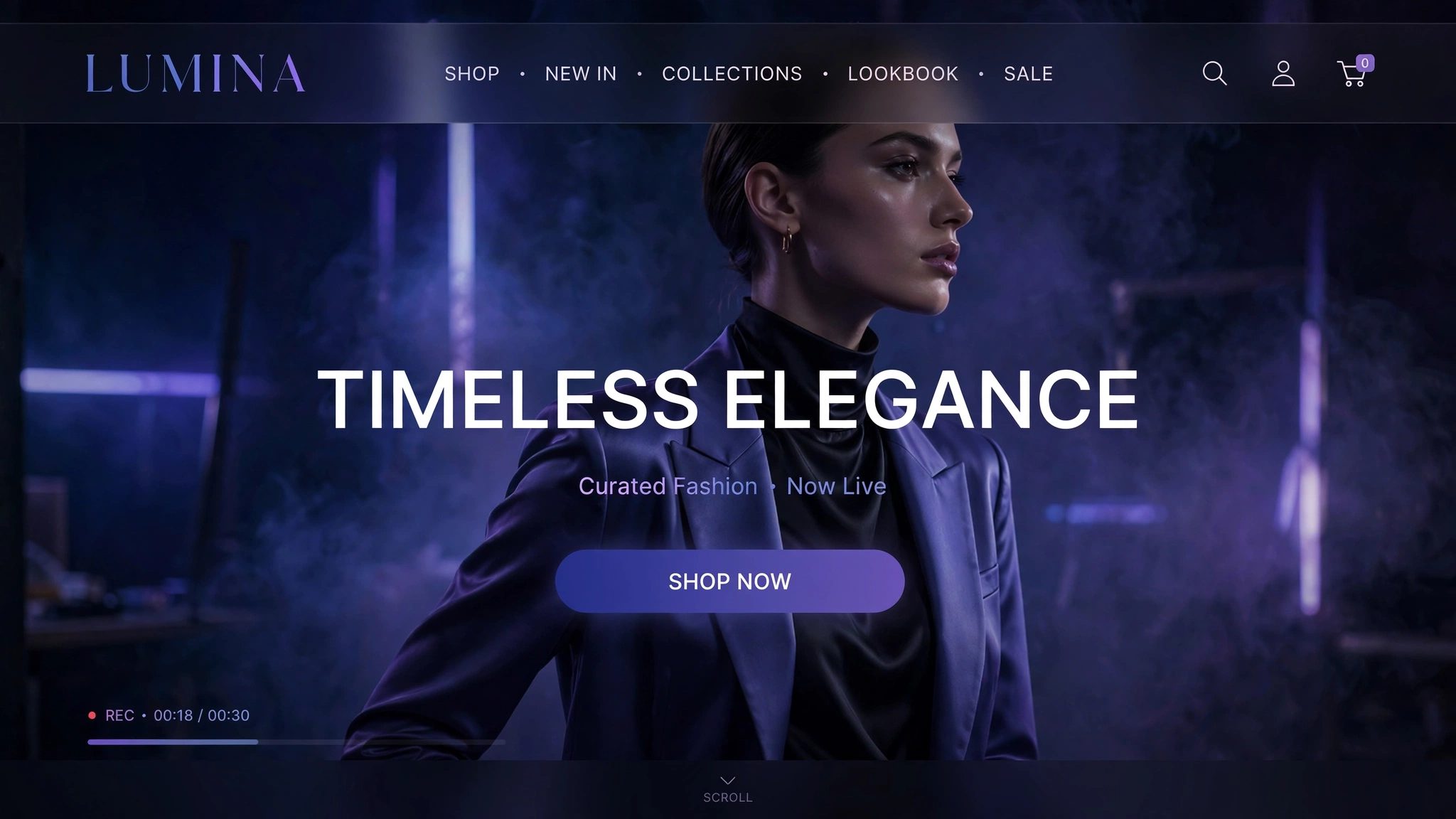
Video backgrounds are the closest thing to a movie trailer for your store — motion, emotion, and atmosphere in the first viewport. Brands pay thousands for video heroes; you’ll build one with 15 lines of code and zero apps. A muted, looping video with a bold headline overlay works on every modern theme.
Here are 6 video hero styles — each with a live playing video below (muted, as browsers require for autoplay). Copy any one into a Custom Liquid section, swap in your own video file, and action!
1. Fashion – Cinematic Fullscreen Film
Full-bleed fashion film with a dark cinematic overlay — your hero becomes a movie premiere. The 45% black overlay keeps white headline text readable over any footage, which is the #1 rule of video heroes: footage is atmosphere, text is king. Muted autoplay is mandatory (browsers block sound), and it loops silently forever.
Preview
Live video hero above ☝️ — muted autoplay, looping.
Liquid Code
<div class="lk-vh1">
  <video autoplay muted loop playsinline><source src="https://storage.googleapis.com/gtv-videos-bucket/sample/ForBiggerBlazes.mp4" type="video/mp4"></video>
  <div class="lk-vh1-overlay">
    <h2>Wear the Moment</h2>
    <p>New Season Film — 2026 Collection</p>
    <a href="/collections/all">Shop the Film</a>
  </div>
</div>
<style>
.lk-vh1{position:relative;height:440px;overflow:hidden;border-radius:16px;background:#000}
.lk-vh1 video{position:absolute;top:0;left:0;width:100%;height:100%;object-fit:cover}
.lk-vh1-overlay{position:absolute;inset:0;display:flex;flex-direction:column;justify-content:center;align-items:center;text-align:center;padding:20px;background:rgba(0,0,0,.45)}
.lk-vh1-overlay h2{color:#fff;font-size:48px;margin:0 0 12px}
.lk-vh1-overlay p{color:#eee;font-size:18px;margin:0 0 24px}
.lk-vh1-overlay a{display:inline-block;background:#fff;color:#111;padding:14px 40px;border-radius:30px;text-decoration:none;font-weight:700}

</style>
2. Beauty – Soft Dreamy Overlay
Beauty videos should feel like a dream sequence: soft-focus footage under a blush-tinted overlay with elegant serif type. The pink wash unifies any footage with your brand palette — even stock video looks bespoke. Keep headline text short; the video is doing the emotional work here.
Preview
Dreamy video hero live ☝️ — soft and radiant.
Liquid Code
<div class="lk-vh2">
  <video autoplay muted loop playsinline><source src="https://storage.googleapis.com/gtv-videos-bucket/sample/ForBiggerEscapes.mp4" type="video/mp4"></video>
  <div class="lk-vh2-overlay">
    <h2>Rituals of Radiance</h2>
    <p>Clean beauty, captured in motion</p>
    <a href="/collections/all">Discover More</a>
  </div>
</div>
<style>
.lk-vh2{position:relative;height:440px;overflow:hidden;border-radius:16px;background:#000}
.lk-vh2 video{position:absolute;top:0;left:0;width:100%;height:100%;object-fit:cover}
.lk-vh2-overlay{position:absolute;inset:0;display:flex;flex-direction:column;justify-content:center;align-items:center;text-align:center;padding:20px;background:rgba(180,120,130,.35)}
.lk-vh2-overlay h2{color:#fff;font-size:48px;font-family:Georgia,serif;font-weight:400;margin:0 0 12px}
.lk-vh2-overlay p{color:#eee;font-size:18px;margin:0 0 24px}
.lk-vh2-overlay a{display:inline-block;background:#fff;color:#111;padding:14px 40px;border-radius:30px;text-decoration:none;font-weight:700}

</style>
3. Travel – Epic Destination Hero
Sweeping destination footage with a gradient overlay that fades to your page background at the bottom — the video melts into the site instead of ending abruptly. That gradient blend is the pro touch that separates amateur video heroes from award-winning ones. Made for travel gear, luggage, and adventure brands.
Preview
Epic video hero live ☝️ — wanderlust activated.
Liquid Code
<div class="lk-vh3">
  <video autoplay muted loop playsinline><source src="https://storage.googleapis.com/gtv-videos-bucket/sample/ForBiggerFun.mp4" type="video/mp4"></video>
  <div class="lk-vh3-overlay">
    <h2>Go Further</h2>
    <p>Gear for the world's wildest places</p>
    <a href="/collections/all">Explore Gear</a>
  </div>
</div>
<style>
.lk-vh3{position:relative;height:440px;overflow:hidden;border-radius:16px;background:#000}
.lk-vh3 video{position:absolute;top:0;left:0;width:100%;height:100%;object-fit:cover}
.lk-vh3-overlay{position:absolute;inset:0;display:flex;flex-direction:column;justify-content:center;align-items:center;text-align:center;padding:20px;background:linear-gradient(to top,rgba(10,10,20,.85),rgba(10,10,20,.25) 60%,rgba(10,10,20,.35))}
.lk-vh3-overlay h2{color:#fff;font-size:48px;margin:0 0 12px}
.lk-vh3-overlay p{color:#eee;font-size:18px;margin:0 0 24px}
.lk-vh3-overlay a{display:inline-block;background:#fff;color:#111;padding:14px 40px;border-radius:30px;text-decoration:none;font-weight:700}

</style>
4. Food – Appetite in Motion
Sizzling, steaming, drizzling — food video triggers cravings that photos can’t touch. The warm amber overlay amplifies the appetite appeal while keeping text readable. Pro tip: food videos should be close-ups in motion (pouring, flipping, steaming), never wide static shots. Motion is flavour.
Preview
Sizzling video hero live ☝️ — hungry yet?
Liquid Code
<div class="lk-vh4">
  <video autoplay muted loop playsinline><source src="https://storage.googleapis.com/gtv-videos-bucket/sample/ForBiggerJoyrides.mp4" type="video/mp4"></video>
  <div class="lk-vh4-overlay">
    <h2>Taste the Sizzle</h2>
    <p>Fresh from our kitchen to your door</p>
    <a href="/collections/all">Order Now</a>
  </div>
</div>
<style>
.lk-vh4{position:relative;height:440px;overflow:hidden;border-radius:16px;background:#000}
.lk-vh4 video{position:absolute;top:0;left:0;width:100%;height:100%;object-fit:cover}
.lk-vh4-overlay{position:absolute;inset:0;display:flex;flex-direction:column;justify-content:center;align-items:center;text-align:center;padding:20px;background:rgba(120,50,0,.4)}
.lk-vh4-overlay h2{color:#fff;font-size:48px;margin:0 0 12px}
.lk-vh4-overlay p{color:#eee;font-size:18px;margin:0 0 24px}
.lk-vh4-overlay a{display:inline-block;background:#fff;color:#111;padding:14px 40px;border-radius:30px;text-decoration:none;font-weight:700}

</style>
5. Fitness – High-Octane Montage
Rapid-cut workout montage under a red-tinted overlay with condensed uppercase type — this hero doesn’t invite, it recruits. The high-energy footage plus aggressive typography creates urgency: join, train, transform. Muted autoplay keeps it punchy without annoying anyone. Beast mode: engaged.
Preview
High-octane hero live ☝️ — no excuses.
Liquid Code
<div class="lk-vh5">
  <video autoplay muted loop playsinline><source src="https://storage.googleapis.com/gtv-videos-bucket/sample/ForBiggerMeltdowns.mp4" type="video/mp4"></video>
  <div class="lk-vh5-overlay">
    <h2>TRAIN LIKE A BEAST</h2>
    <p>Programs, gear & fuel for killers</p>
    <a href="/collections/all">Start Today</a>
  </div>
</div>
<style>
.lk-vh5{position:relative;height:440px;overflow:hidden;border-radius:16px;background:#000}
.lk-vh5 video{position:absolute;top:0;left:0;width:100%;height:100%;object-fit:cover}
.lk-vh5-overlay{position:absolute;inset:0;display:flex;flex-direction:column;justify-content:center;align-items:center;text-align:center;padding:20px;background:rgba(60,0,0,.5)}
.lk-vh5-overlay h2{color:#fff;font-size:48px;font-weight:900;letter-spacing:2px;margin:0 0 12px}
.lk-vh5-overlay p{color:#eee;font-size:18px;margin:0 0 24px}
.lk-vh5-overlay a{display:inline-block;background:#fff;color:#111;padding:14px 40px;border-radius:30px;text-decoration:none;font-weight:700}

</style>
6. Minimal – Quiet Looping Ambience
Not every video hero needs to shout. A slow, abstract loop — ink in water, fabric in wind — under near-transparent overlay with whisper-quiet type. The video becomes texture, not content. Perfect for premium minimal brands where the loudest thing on the page should still be a whisper.
Preview
Quiet video hero live ☝️ — luxury in a whisper.
Liquid Code
<div class="lk-vh6">
  <video autoplay muted loop playsinline><source src="https://storage.googleapis.com/gtv-videos-bucket/sample/ForBiggerThrills.mp4" type="video/mp4"></video>
  <div class="lk-vh6-overlay">
    <h2>Less, but better</h2>
    <p>Considered goods for intentional living</p>
    <a href="/collections/all">Browse the Collection</a>
  </div>
</div>
<style>
.lk-vh6{position:relative;height:440px;overflow:hidden;border-radius:16px;background:#000}
.lk-vh6 video{position:absolute;top:0;left:0;width:100%;height:100%;object-fit:cover}
.lk-vh6-overlay{position:absolute;inset:0;display:flex;flex-direction:column;justify-content:center;align-items:center;text-align:center;padding:20px;background:rgba(255,255,255,.15)}
.lk-vh6-overlay h2{color:#1a1a1a;font-size:44px;font-weight:400;margin:0 0 12px}
.lk-vh6-overlay p{color:#555;font-size:18px;margin:0 0 24px}
.lk-vh6-overlay a{display:inline-block;background:#fff;color:#111;padding:14px 40px;border-radius:30px;text-decoration:none;font-weight:700}

</style>
How to Add Video Background Hero Section to Shopify
- From your Shopify admin, go to Online Store → Themes.
- Click Customize on your live (published) theme.
- In the theme editor sidebar, click Add section → Custom Liquid.
- Copy the code from any variation above and paste it into the Custom Liquid box.
- Drag the section where you want it on the homepage and click Save — done! No app needed.
Using your own video: in Shopify admin go to Content → Files, upload your MP4 (under 20MB, 10–20 seconds, no audio needed), copy its link, and replace the src="..." URL in the code.
Customize the Video Background Hero Section
- Replace the demo video URL with your own MP4 from Shopify Files (Content → Files → upload → copy link).
- Adjust the overlay darkness: raise the alpha (e.g.
.45→.65) for brighter footage, lower it for dark footage. - Change the height:
height:440px→70vhfor a taller cinematic hero, or320pxfor a slim banner. - Mobile tip: add a poster image via
poster="..."on the<video>tag as a fallback while the video loads. - Keep videos short, muted and loopless-feeling (10–20s seamless loops) — browsers require
mutedfor autoplay to work.
More Shopify Code Sections
- Shopify Hero Banner Text Animation (Liquid + CSS)
- Shopify Animated Gradient Text Effect
- Shopify Liquid Typing Text Effect
- Shopify Animated Counter Section
- Shopify Testimonial Auto Slider
- Shopify Video Background Hero Section
- Shopify Scrolling Brand Logos Section
- Shopify Image Hover Zoom Effect
Conclusion
A video background hero turns your homepage into a cinema — and cinemas sell tickets. Keep the video short, muted, and atmospheric; keep the text bold and readable; and always upload your own footage for the real brand impact. Fifteen lines of code, zero apps, one unforgettable first impression. Lights, camera, conversions.
Want more copy-paste Shopify sections like this? Check out LayoutKart’s premium Shopify templates — professionally designed themes packed with conversion-boosting sections, ready to launch in minutes.
