
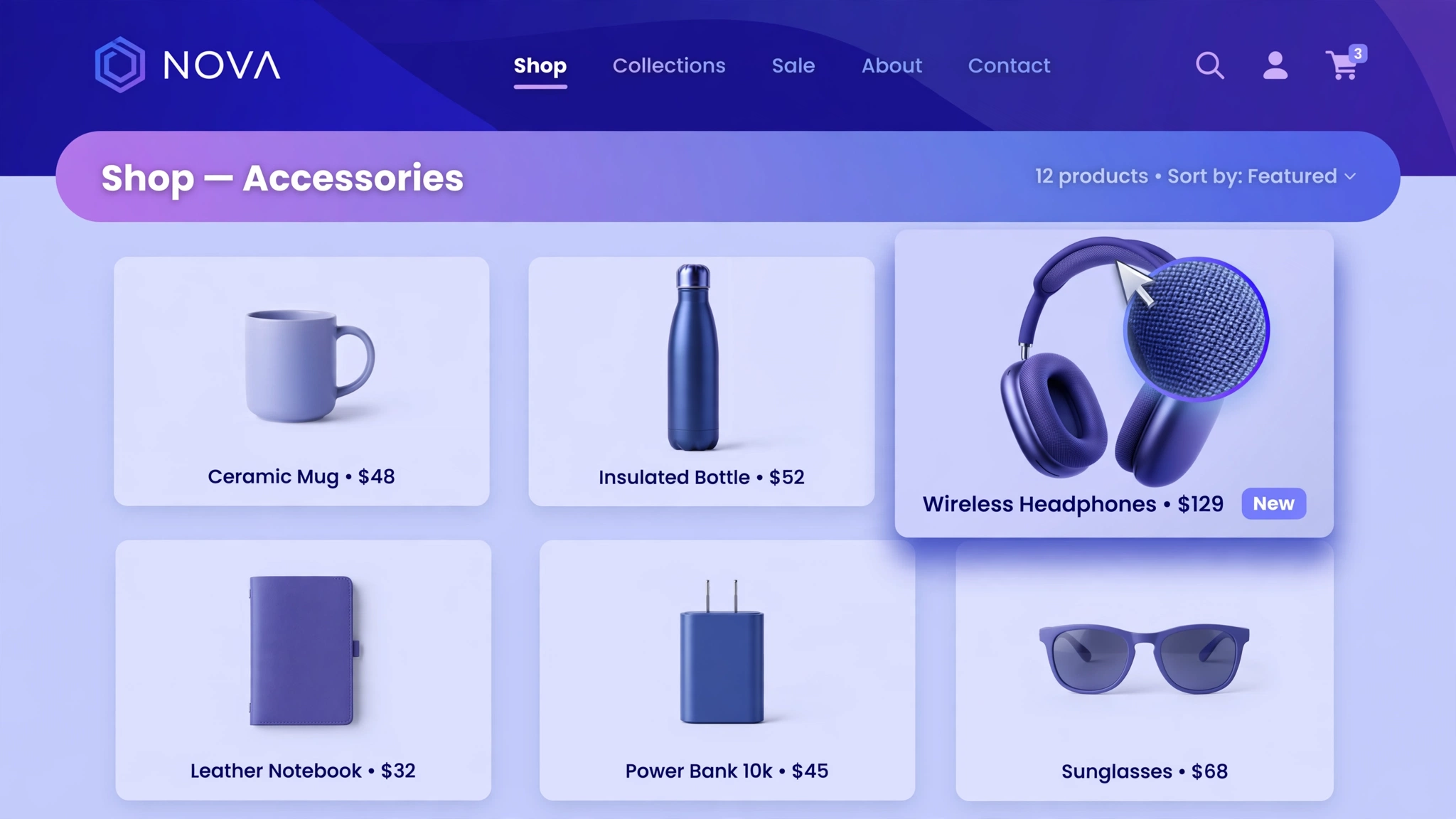
Hover effects are the secret handshake of great ecommerce design — they tell shoppers “yes, this is clickable” without a single word. A smooth image zoom on hover makes product grids feel alive and premium, and it’s one of the easiest wins in this entire series: pure CSS, no app, no JavaScript.
Below are 6 hover-zoom styles for different stores. Hover over the live demos to feel each one, then copy the code into a Custom Liquid section. Your product cards will never look flat again.
1. Fashion – Smooth Zoom on Hover
The classic: images glide to 115% scale on hover with a buttery 0.6s ease. It works on every fashion grid because it mimics what premium retailers do — the product leans toward you, inviting a click. Subtle enough for minimal brands, noticeable enough to lift engagement. If you only add one hover effect ever, make it this one.
Preview
Product 1 – $49
Product 2 – $49
Product 3 – $49
Hover the product images above ☝️ — smooth zoom in action.
Liquid Code
<div class="lk-zm1-grid"><div class="lk-zm1-card"><img src="https://picsum.photos/seed/lk-zm11/400/500" alt="Product 1"><p>Product 1 – $49</p></div><div class="lk-zm1-card"><img src="https://picsum.photos/seed/lk-zm12/400/500" alt="Product 2"><p>Product 2 – $49</p></div><div class="lk-zm1-card"><img src="https://picsum.photos/seed/lk-zm13/400/500" alt="Product 3"><p>Product 3 – $49</p></div></div>
<style>
.lk-zm1-grid{display:flex;gap:16px;justify-content:center;flex-wrap:wrap;background:#ffffff;padding:30px 16px;border-radius:12px}
.lk-zm1-card{width:200px;overflow:hidden;border-radius:12px;background:#f7f7f7;}
.lk-zm1-card img{width:100%;height:260px;object-fit:cover;display:block;transition:transform .6s ease}
.lk-zm1-card:hover img{transform:scale(1.15)}
.lk-zm1-card p{text-align:center;font-weight:600;margin:12px 8px;font-size:14px}
</style>
2. Beauty – Soft Gentle Zoom
Beauty shoppers are sensitive souls — hit them with an aggressive zoom and it feels cheap. This gentle 108% scale with a slower 0.9s ease is like the product leaning in for a closer look. Pair it with rounded cards and soft shadows and your grid will feel like a high-end beauty counter.
Preview
Product 1 – $49
Product 2 – $49
Product 3 – $49
Hover above ☝️ — gentle, like a serum texture.
Liquid Code
<div class="lk-zm2-grid"><div class="lk-zm2-card"><img src="https://picsum.photos/seed/lk-zm21/400/500" alt="Product 1"><p>Product 1 – $49</p></div><div class="lk-zm2-card"><img src="https://picsum.photos/seed/lk-zm22/400/500" alt="Product 2"><p>Product 2 – $49</p></div><div class="lk-zm2-card"><img src="https://picsum.photos/seed/lk-zm23/400/500" alt="Product 3"><p>Product 3 – $49</p></div></div>
<style>
.lk-zm2-grid{display:flex;gap:16px;justify-content:center;flex-wrap:wrap;background:#fdf7f4;padding:30px 16px;border-radius:12px}
.lk-zm2-card{width:200px;overflow:hidden;border-radius:12px;background:#ffffff;box-shadow:0 4px 18px rgba(0,0,0,.06)}
.lk-zm2-card img{width:100%;height:260px;object-fit:cover;display:block;transition:transform .6s ease}
.lk-zm2-card:hover img{transform:scale(1.08)}
.lk-zm2-card p{text-align:center;font-weight:600;margin:12px 8px;font-size:14px}
</style>
3. Furniture – Zoom with Quick-View Overlay
Zoom plus a sliding overlay button: the image scales while a ‘Quick View’ bar rises from the bottom. Furniture shoppers hate commitment — this gives them a low-friction peek without leaving the collection page. The overlay uses a semi-transparent dark bar so product details stay readable over any image.
Preview
Oak Chair – $199
Linen Sofa – $899
Brass Lamp – $129
Hover above ☝️ — zoom + Quick View bar slides up.
Liquid Code
<div class="lk-zm3-grid">
  <div class="lk-zm3-card"><img src="https://picsum.photos/seed/lkzm3a/400/500" alt="Chair"><span class="lk-zm3-ov">Quick View</span><p>Oak Chair – $199</p></div>
  <div class="lk-zm3-card"><img src="https://picsum.photos/seed/lkzm3b/400/500" alt="Sofa"><span class="lk-zm3-ov">Quick View</span><p>Linen Sofa – $899</p></div>
  <div class="lk-zm3-card"><img src="https://picsum.photos/seed/lkzm3c/400/500" alt="Lamp"><span class="lk-zm3-ov">Quick View</span><p>Brass Lamp – $129</p></div>
</div>
<style>
.lk-zm3-grid{display:flex;gap:16px;justify-content:center;flex-wrap:wrap;background:#f5f1e8;padding:30px 16px;border-radius:12px}
.lk-zm3-card{position:relative;width:200px;overflow:hidden;border-radius:10px;background:#fff}
.lk-zm3-card img{width:100%;height:260px;object-fit:cover;display:block;transition:transform .6s ease}
.lk-zm3-card:hover img{transform:scale(1.12)}
.lk-zm3-ov{position:absolute;left:0;right:0;bottom:44px;background:rgba(20,20,20,.75);color:#fff;text-align:center;padding:10px;font-size:13px;font-weight:700;letter-spacing:1px;transform:translateY(110%);transition:transform .4s ease}
.lk-zm3-card:hover .lk-zm3-ov{transform:translateY(0)}
.lk-zm3-card p{text-align:center;font-weight:600;margin:12px 8px;font-size:14px}
</style>
4. Food – Quick Pop Zoom
Food is impulse — your hover should be too. This snappy 0.25s zoom hits 120% scale almost instantly, like the dish is jumping off the screen toward hungry mouths. The speed is the whole point: no gentle easing, just appetite. Use it for restaurants, bakeries, and snack brands where cravings drive clicks.
Preview
Product 1 – $49
Product 2 – $49
Product 3 – $49
Hover above ☝️ — fast pop, instant appetite.
Liquid Code
<div class="lk-zm4-grid"><div class="lk-zm4-card"><img src="https://picsum.photos/seed/lk-zm41/400/500" alt="Product 1"><p>Product 1 – $49</p></div><div class="lk-zm4-card"><img src="https://picsum.photos/seed/lk-zm42/400/500" alt="Product 2"><p>Product 2 – $49</p></div><div class="lk-zm4-card"><img src="https://picsum.photos/seed/lk-zm43/400/500" alt="Product 3"><p>Product 3 – $49</p></div></div>
<style>
.lk-zm4-grid{display:flex;gap:16px;justify-content:center;flex-wrap:wrap;background:#fff8e7;padding:30px 16px;border-radius:12px}
.lk-zm4-card{width:200px;overflow:hidden;border-radius:12px;background:#ffffff;}
.lk-zm4-card img{width:100%;height:240px;object-fit:cover;display:block;transition:transform .25s cubic-bezier(.2,.9,.3,1.3)}
.lk-zm4-card:hover img{transform:scale(1.2)}
.lk-zm4-card p{text-align:center;font-weight:600;margin:12px 8px;font-size:14px}
</style>
5. Electronics – Zoom with Neon Border Glow
Zoom plus an electric border glow: the image scales while a cyan border ignites around the card. It reads as ‘this product is powered on’ — perfect for gadgets, LED gear, and gaming accessories. The glow uses box-shadow so it works on any card shape, and the dark background makes the neon pop even harder.
Preview
Headphones – $149
Smart Watch – $249
Speaker – $99
Hover above ☝️ — zoom with electric glow.
Liquid Code
<div class="lk-zm5-grid">
  <div class="lk-zm5-card"><img src="https://picsum.photos/seed/lkzm5a/400/500" alt="Headphones"><p>Headphones – $149</p></div>
  <div class="lk-zm5-card"><img src="https://picsum.photos/seed/lkzm5b/400/500" alt="Watch"><p>Smart Watch – $249</p></div>
  <div class="lk-zm5-card"><img src="https://picsum.photos/seed/lkzm5c/400/500" alt="Speaker"><p>Speaker – $99</p></div>
</div>
<style>
.lk-zm5-grid{display:flex;gap:18px;justify-content:center;flex-wrap:wrap;background:#0a0a12;padding:30px 16px;border-radius:12px}
.lk-zm5-card{width:200px;overflow:hidden;border-radius:12px;background:#151522;border:2px solid transparent;transition:border-color .4s, box-shadow .4s}
.lk-zm5-card img{width:100%;height:260px;object-fit:cover;display:block;transition:transform .6s ease}
.lk-zm5-card:hover img{transform:scale(1.15)}
.lk-zm5-card:hover{border-color:#00ffcc;box-shadow:0 0 22px rgba(0,255,204,.45)}
.lk-zm5-card p{text-align:center;font-weight:600;margin:12px 8px;font-size:14px;color:#fff}
</style>
6. Art – Slow Cinematic Zoom
Art deserves cinema, not pop. This luxurious 1.8-second zoom drifts to 125% like a slow camera push-in — the Ken Burns effect, right on your collection page. It makes prints and photography feel gallery-worthy. The near-silent slowness is the flex: it tells buyers this work is worth looking at slowly.
Preview
Product 1 – $49
Product 2 – $49
Product 3 – $49
Hover above ☝️ — slow, cinematic drift.
Liquid Code
<div class="lk-zm6-grid"><div class="lk-zm6-card"><img src="https://picsum.photos/seed/lk-zm61/400/500" alt="Product 1"><p>Product 1 – $49</p></div><div class="lk-zm6-card"><img src="https://picsum.photos/seed/lk-zm62/400/500" alt="Product 2"><p>Product 2 – $49</p></div><div class="lk-zm6-card"><img src="https://picsum.photos/seed/lk-zm63/400/500" alt="Product 3"><p>Product 3 – $49</p></div></div>
<style>
.lk-zm6-grid{display:flex;gap:16px;justify-content:center;flex-wrap:wrap;background:#111111;padding:30px 16px;border-radius:12px}
.lk-zm6-card{width:200px;overflow:hidden;border-radius:12px;background:#1c1c1c;}
.lk-zm6-card img{width:100%;height:280px;object-fit:cover;display:block;transition:transform 1.8s ease}
.lk-zm6-card:hover img{transform:scale(1.25)}
.lk-zm6-card p{text-align:center;font-weight:600;margin:12px 8px;font-size:14px;color:#eee}
</style>
How to Add Image Hover Zoom Effect to Shopify
- From your Shopify admin, go to Online Store → Themes.
- Click Customize on your live (published) theme.
- In the theme editor sidebar, click Add section → Custom Liquid.
- Copy the code from any variation above and paste it into the Custom Liquid box.
- Drag the section where you want it on the homepage and click Save — done! No app needed.
Customize the Image Hover Zoom Effect
- Change the zoom amount:
scale(1.15)→scale(1.3)for drama,scale(1.05)for subtle. - Control the speed:
transition:transform .6s ease— lower is snappier, higher is more luxurious. - Apply it to your real product cards: add the
:hover imgrule to your theme’s card class instead of the demo grid. - Combine with rounded corners or shadows on the card for extra polish — keep
overflow:hiddenso the zoom stays inside. - For second-image-on-hover, layer two images and fade the top one out on hover (see our product image hover tutorial).
More Shopify Code Sections
- Shopify Product Image Hover Change
- Shopify Product Card Hover Effect
- Shopify Product Card Sale Badge
- Shopify Collection Product Grid Custom CSS
- Shopify Hero Banner Text Animation (Liquid + CSS)
- Shopify Before & After Image Slider
- Shopify Image Hover Zoom Effect
- Shopify Product Card Quick View Button
Conclusion
Image hover zoom is the definition of a small change with outsized impact — five lines of CSS that make your entire catalogue feel interactive. Start with the variation that fits your brand’s energy, tune the speed and scale, then apply the same :hover rule to your theme’s real product cards. No app, no JavaScript, no excuses.
Want more copy-paste Shopify sections like this? Check out LayoutKart’s premium Shopify templates — professionally designed themes packed with conversion-boosting sections, ready to launch in minutes.
