
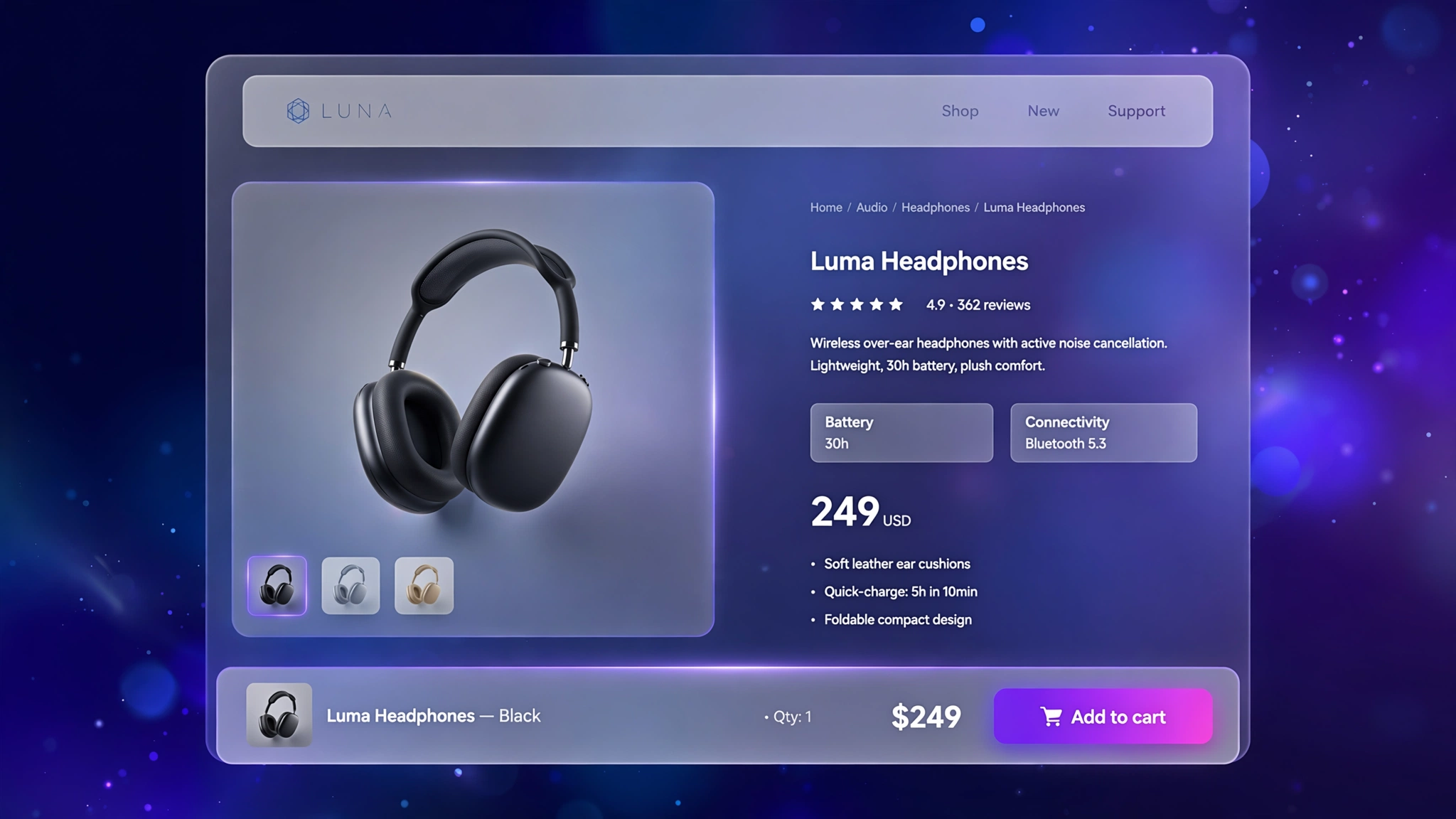
Here’s a frustratingly common story: a shopper scrolls through your beautiful long product page, decides to buy… and then can’t find the Add to Cart button without scrolling all the way back up. Many just leave. A sticky add to cart bar fixes this — a slim bar pinned to the screen with the product name, price and a buy button that follows the shopper everywhere. It is one of the simplest conversion wins on Shopify, and you can build it with Liquid plus a few lines of JS. Six styles below, all copy-paste ready for a Custom Liquid section.
1. Bottom – Full-Width Bar
The workhorse — a full-width bar pinned to the bottom with image, title, price, variant picker and button. Converts on every store type.
Preview
Sample Product₹1,299Add to Cart
Sample: The bar slides in after scrolling 300px and stays pinned while shopping.
Liquid Code
{% comment %} LayoutKart - Sticky Add to Cart (Bottom Bar) {% endcomment %}
<style>
.lk-sticky-s1{position:fixed;bottom:0;left:0;right:0;z-index:9990;background:#ffffff;border-top:1px solid #e5e7eb;
padding:12px 20px;display:flex;align-items:center;gap:16px;justify-content:center;flex-wrap:wrap;
transform:translateY(110%);transition:transform .3s ease;box-shadow:0 -8px 30px rgba(0,0,0,.12);}
.lk-sticky-s1.show{transform:translateY(0);}
.lk-sticky-s1 img{width:48px;height:48px;object-fit:cover;border-radius:10px;}
.lk-sticky-s1 .lk-pt{font-weight:700;color:#111111;font-size:15px;}
.lk-sticky-s1 .lk-pr{font-weight:700;color:#111111;font-size:16px;}
.lk-sticky-s1 select{padding:10px;border-radius:8px;border:1px solid #ddd;font-size:14px;}
.lk-sticky-s1 .lk-btn{padding:12px 30px;border:none;border-radius:10px;cursor:pointer;
background:#111111;color:#ffffff;font-weight:700;font-size:15px;}
@media(max-width:600px){.lk-sticky-s1 .lk-pt{display:none;}}
</style>
<div class="lk-sticky-s1" id="lkStickys1">
  <img src="{{ product.featured_image | image_url: width: 96 }}" alt="{{ product.title | escape }}" loading="lazy">
  <span class="lk-pt">{{ product.title | truncate: 40 }}</span>
  <span class="lk-pr">{{ product.price | money }}</span>
  <select id="lkStickyVars1" aria-label="Choose variant">
    {% for variant in product.variants %}
    <option value="{{ variant.id }}">{{ variant.title }} — {{ variant.price | money }}</option>
    {% endfor %}
  </select>
  <button class="lk-btn" id="lkStickyBtns1">Add to Cart</button>
</div>
<script>
(function(){
var bar=document.getElementById('lkStickys1');
window.addEventListener('scroll',function(){
if(window.scrollY>300){bar.classList.add('show');}else{bar.classList.remove('show');}},{passive:true});
document.getElementById('lkStickyBtns1').addEventListener('click',function(){
var id=document.getElementById('lkStickyVars1').value;
this.textContent='Adding...';
fetch('/cart/add.js',{method:'POST',headers:{'Content-Type':'application/json'},
body:JSON.stringify({id:parseInt(id,10),quantity:1})})
.then(r=>r.json()).then(()=>{this.textContent='Added ✓';setTimeout(()=>this.textContent='Add to Cart',1500);})
.catch(()=>{this.textContent='Try again';});});
})();
</script>
2. Top – Slim Top Bar
A slim bar pinned to the top for stores with short product pages — always visible, never in the way.
Preview
Sample Product₹1,299Add to Cart
Sample: The bar slides in after scrolling 300px and stays pinned while shopping.
Liquid Code
{% comment %} LayoutKart - Sticky Add to Cart (Top Slim) {% endcomment %}
<style>
.lk-sticky-s2{position:fixed;top:0;left:0;right:0;z-index:9990;background:#111111;border-top:none;
padding:12px 20px;display:flex;align-items:center;gap:16px;justify-content:center;flex-wrap:wrap;
transform:translateY(-110%);transition:transform .3s ease;box-shadow:0 -8px 30px rgba(0,0,0,.12);}
.lk-sticky-s2.show{transform:translateY(0);}
.lk-sticky-s2 img{width:48px;height:48px;object-fit:cover;border-radius:8px;}
.lk-sticky-s2 .lk-pt{font-weight:700;color:#ffffff;font-size:15px;}
.lk-sticky-s2 .lk-pr{font-weight:700;color:#ffffff;font-size:16px;}
.lk-sticky-s2 select{padding:10px;border-radius:8px;border:1px solid #ddd;font-size:14px;}
.lk-sticky-s2 .lk-btn{padding:12px 30px;border:none;border-radius:8px;cursor:pointer;
background:#22c55e;color:#ffffff;font-weight:700;font-size:15px;}
@media(max-width:600px){.lk-sticky-s2 .lk-pt{display:none;}}
</style>
<div class="lk-sticky-s2" id="lkStickys2">
  <img src="{{ product.featured_image | image_url: width: 96 }}" alt="{{ product.title | escape }}" loading="lazy">
  <span class="lk-pt">{{ product.title | truncate: 40 }}</span>
  <span class="lk-pr">{{ product.price | money }}</span>
  <select id="lkStickyVars2" aria-label="Choose variant">
    {% for variant in product.variants %}
    <option value="{{ variant.id }}">{{ variant.title }} — {{ variant.price | money }}</option>
    {% endfor %}
  </select>
  <button class="lk-btn" id="lkStickyBtns2">Add to Cart</button>
</div>
<script>
(function(){
var bar=document.getElementById('lkStickys2');
window.addEventListener('scroll',function(){
if(window.scrollY>300){bar.classList.add('show');}else{bar.classList.remove('show');}},{passive:true});
document.getElementById('lkStickyBtns2').addEventListener('click',function(){
var id=document.getElementById('lkStickyVars2').value;
this.textContent='Adding...';
fetch('/cart/add.js',{method:'POST',headers:{'Content-Type':'application/json'},
body:JSON.stringify({id:parseInt(id,10),quantity:1})})
.then(r=>r.json()).then(()=>{this.textContent='Added ✓';setTimeout(()=>this.textContent='Add to Cart',1500);})
.catch(()=>{this.textContent='Try again';});});
})();
</script>
3. Pill – Floating Rounded Pill
A floating pill that hovers above the content — playful and modern, great for DTC and beauty brands.
Preview
Sample Product₹1,299Add to Cart
Sample: The bar slides in after scrolling 300px and stays pinned while shopping.
Liquid Code
{% comment %} LayoutKart - Sticky Add to Cart (Floating Pill) {% endcomment %}
<style>
.lk-sticky-s3{position:fixed;bottom:18px;left:0;right:0;z-index:9990;background:#ffffff;border-top:1px solid #e5e7eb;
padding:12px 20px;display:flex;align-items:center;gap:16px;justify-content:center;flex-wrap:wrap;
transform:translateY(150%);transition:transform .3s ease;box-shadow:0 -8px 30px rgba(0,0,0,.12);}
.lk-sticky-s3.show{transform:translateY(0);}
.lk-sticky-s3 img{width:48px;height:48px;object-fit:cover;border-radius:99px;}
.lk-sticky-s3 .lk-pt{font-weight:700;color:#111111;font-size:15px;}
.lk-sticky-s3 .lk-pr{font-weight:700;color:#111111;font-size:16px;}
.lk-sticky-s3 select{padding:10px;border-radius:8px;border:1px solid #ddd;font-size:14px;}
.lk-sticky-s3 .lk-btn{padding:12px 30px;border:none;border-radius:99px;cursor:pointer;
background:#7c3aed;color:#ffffff;font-weight:700;font-size:15px;}
@media(max-width:600px){.lk-sticky-s3 .lk-pt{display:none;}}
</style>
<div class="lk-sticky-s3" id="lkStickys3">
  <img src="{{ product.featured_image | image_url: width: 96 }}" alt="{{ product.title | escape }}" loading="lazy">
  <span class="lk-pt">{{ product.title | truncate: 40 }}</span>
  <span class="lk-pr">{{ product.price | money }}</span>
  <select id="lkStickyVars3" aria-label="Choose variant">
    {% for variant in product.variants %}
    <option value="{{ variant.id }}">{{ variant.title }} — {{ variant.price | money }}</option>
    {% endfor %}
  </select>
  <button class="lk-btn" id="lkStickyBtns3">Add to Cart</button>
</div>
<script>
(function(){
var bar=document.getElementById('lkStickys3');
window.addEventListener('scroll',function(){
if(window.scrollY>300){bar.classList.add('show');}else{bar.classList.remove('show');}},{passive:true});
document.getElementById('lkStickyBtns3').addEventListener('click',function(){
var id=document.getElementById('lkStickyVars3').value;
this.textContent='Adding...';
fetch('/cart/add.js',{method:'POST',headers:{'Content-Type':'application/json'},
body:JSON.stringify({id:parseInt(id,10),quantity:1})})
.then(r=>r.json()).then(()=>{this.textContent='Added ✓';setTimeout(()=>this.textContent='Add to Cart',1500);})
.catch(()=>{this.textContent='Try again';});});
})();
</script>
4. Dark – Dark Premium Bar
Midnight styling with a gold button for luxury stores — the bar itself feels expensive.
Preview
Sample Product₹1,299Add to Cart
Sample: The bar slides in after scrolling 300px and stays pinned while shopping.
Liquid Code
{% comment %} LayoutKart - Sticky Add to Cart (Dark Premium) {% endcomment %}
<style>
.lk-sticky-s4{position:fixed;bottom:0;left:0;right:0;z-index:9990;background:#0f172a;border-top:1px solid #1e293b;
padding:12px 20px;display:flex;align-items:center;gap:16px;justify-content:center;flex-wrap:wrap;
transform:translateY(110%);transition:transform .3s ease;box-shadow:0 -8px 30px rgba(0,0,0,.12);}
.lk-sticky-s4.show{transform:translateY(0);}
.lk-sticky-s4 img{width:48px;height:48px;object-fit:cover;border-radius:8px;}
.lk-sticky-s4 .lk-pt{font-weight:700;color:#f8fafc;font-size:15px;}
.lk-sticky-s4 .lk-pr{font-weight:700;color:#f8fafc;font-size:16px;}
.lk-sticky-s4 select{padding:10px;border-radius:8px;border:1px solid #ddd;font-size:14px;}
.lk-sticky-s4 .lk-btn{padding:12px 30px;border:none;border-radius:8px;cursor:pointer;
background:#d4af37;color:#0f172a;font-weight:700;font-size:15px;}
@media(max-width:600px){.lk-sticky-s4 .lk-pt{display:none;}}
</style>
<div class="lk-sticky-s4" id="lkStickys4">
  <img src="{{ product.featured_image | image_url: width: 96 }}" alt="{{ product.title | escape }}" loading="lazy">
  <span class="lk-pt">{{ product.title | truncate: 40 }}</span>
  <span class="lk-pr">{{ product.price | money }}</span>
  <select id="lkStickyVars4" aria-label="Choose variant">
    {% for variant in product.variants %}
    <option value="{{ variant.id }}">{{ variant.title }} — {{ variant.price | money }}</option>
    {% endfor %}
  </select>
  <button class="lk-btn" id="lkStickyBtns4">Add to Cart</button>
</div>
<script>
(function(){
var bar=document.getElementById('lkStickys4');
window.addEventListener('scroll',function(){
if(window.scrollY>300){bar.classList.add('show');}else{bar.classList.remove('show');}},{passive:true});
document.getElementById('lkStickyBtns4').addEventListener('click',function(){
var id=document.getElementById('lkStickyVars4').value;
this.textContent='Adding...';
fetch('/cart/add.js',{method:'POST',headers:{'Content-Type':'application/json'},
body:JSON.stringify({id:parseInt(id,10),quantity:1})})
.then(r=>r.json()).then(()=>{this.textContent='Added ✓';setTimeout(()=>this.textContent='Add to Cart',1500);})
.catch(()=>{this.textContent='Try again';});});
})();
</script>
5. Image – Thumbnail Focus Bar
Leads with a big product thumbnail — perfect for fashion where the visual reminder triggers the purchase.
Preview
Sample Product₹1,299Add to Cart
Sample: The bar slides in after scrolling 300px and stays pinned while shopping.
Liquid Code
{% comment %} LayoutKart - Sticky Add to Cart (Thumb Focus) {% endcomment %}
<style>
.lk-sticky-s5{position:fixed;bottom:0;left:0;right:0;z-index:9990;background:#fff7ed;border-top:2px solid #fed7aa;
padding:12px 20px;display:flex;align-items:center;gap:16px;justify-content:center;flex-wrap:wrap;
transform:translateY(110%);transition:transform .3s ease;box-shadow:0 -8px 30px rgba(0,0,0,.12);}
.lk-sticky-s5.show{transform:translateY(0);}
.lk-sticky-s5 img{width:48px;height:48px;object-fit:cover;border-radius:14px;}
.lk-sticky-s5 .lk-pt{font-weight:700;color:#7c2d12;font-size:15px;}
.lk-sticky-s5 .lk-pr{font-weight:700;color:#7c2d12;font-size:16px;}
.lk-sticky-s5 select{padding:10px;border-radius:8px;border:1px solid #ddd;font-size:14px;}
.lk-sticky-s5 .lk-btn{padding:12px 30px;border:none;border-radius:14px;cursor:pointer;
background:#ea580c;color:#ffffff;font-weight:700;font-size:15px;}
@media(max-width:600px){.lk-sticky-s5 .lk-pt{display:none;}}
</style>
<div class="lk-sticky-s5" id="lkStickys5">
  <img src="{{ product.featured_image | image_url: width: 96 }}" alt="{{ product.title | escape }}" loading="lazy">
  <span class="lk-pt">{{ product.title | truncate: 40 }}</span>
  <span class="lk-pr">{{ product.price | money }}</span>
  <select id="lkStickyVars5" aria-label="Choose variant">
    {% for variant in product.variants %}
    <option value="{{ variant.id }}">{{ variant.title }} — {{ variant.price | money }}</option>
    {% endfor %}
  </select>
  <button class="lk-btn" id="lkStickyBtns5">Add to Cart</button>
</div>
<script>
(function(){
var bar=document.getElementById('lkStickys5');
window.addEventListener('scroll',function(){
if(window.scrollY>300){bar.classList.add('show');}else{bar.classList.remove('show');}},{passive:true});
document.getElementById('lkStickyBtns5').addEventListener('click',function(){
var id=document.getElementById('lkStickyVars5').value;
this.textContent='Adding...';
fetch('/cart/add.js',{method:'POST',headers:{'Content-Type':'application/json'},
body:JSON.stringify({id:parseInt(id,10),quantity:1})})
.then(r=>r.json()).then(()=>{this.textContent='Added ✓';setTimeout(()=>this.textContent='Add to Cart',1500);})
.catch(()=>{this.textContent='Try again';});});
})();
</script>
6. Minimal – Text-Only Bar
Just price and button, ultra-slim — for minimal brands that find sticky bars a bit much.
Preview
Sample Product₹1,299Add to Cart
Sample: The bar slides in after scrolling 300px and stays pinned while shopping.
Liquid Code
{% comment %} LayoutKart - Sticky Add to Cart (Minimal Slim) {% endcomment %}
<style>
.lk-sticky-s6{position:fixed;bottom:0;left:0;right:0;z-index:9990;background:#ffffff;border-top:1px solid #eee;
padding:12px 20px;display:flex;align-items:center;gap:16px;justify-content:center;flex-wrap:wrap;
transform:translateY(110%);transition:transform .3s ease;box-shadow:0 -8px 30px rgba(0,0,0,.12);}
.lk-sticky-s6.show{transform:translateY(0);}
.lk-sticky-s6 img{width:48px;height:48px;object-fit:cover;border-radius:0px;}
.lk-sticky-s6 .lk-pt{font-weight:700;color:#111111;font-size:15px;}
.lk-sticky-s6 .lk-pr{font-weight:700;color:#111111;font-size:16px;}
.lk-sticky-s6 select{padding:10px;border-radius:8px;border:1px solid #ddd;font-size:14px;}
.lk-sticky-s6 .lk-btn{padding:12px 30px;border:none;border-radius:0px;cursor:pointer;
background:#111111;color:#ffffff;font-weight:700;font-size:15px;}
@media(max-width:600px){.lk-sticky-s6 .lk-pt{display:none;}}
</style>
<div class="lk-sticky-s6" id="lkStickys6">
  <img src="{{ product.featured_image | image_url: width: 96 }}" alt="{{ product.title | escape }}" loading="lazy">
  <span class="lk-pt">{{ product.title | truncate: 40 }}</span>
  <span class="lk-pr">{{ product.price | money }}</span>
  <select id="lkStickyVars6" aria-label="Choose variant">
    {% for variant in product.variants %}
    <option value="{{ variant.id }}">{{ variant.title }} — {{ variant.price | money }}</option>
    {% endfor %}
  </select>
  <button class="lk-btn" id="lkStickyBtns6">Add to Cart</button>
</div>
<script>
(function(){
var bar=document.getElementById('lkStickys6');
window.addEventListener('scroll',function(){
if(window.scrollY>300){bar.classList.add('show');}else{bar.classList.remove('show');}},{passive:true});
document.getElementById('lkStickyBtns6').addEventListener('click',function(){
var id=document.getElementById('lkStickyVars6').value;
this.textContent='Adding...';
fetch('/cart/add.js',{method:'POST',headers:{'Content-Type':'application/json'},
body:JSON.stringify({id:parseInt(id,10),quantity:1})})
.then(r=>r.json()).then(()=>{this.textContent='Added ✓';setTimeout(()=>this.textContent='Add to Cart',1500);})
.catch(()=>{this.textContent='Try again';});});
})();
</script>
How to Add Sticky Add to Cart Bar to Shopify
No app needed — this works with a free built-in Shopify feature called the Custom Liquid section. It takes about two minutes:
- From your Shopify admin, go to Online Store → Themes.
- Click Customize next to your live theme (works with Dawn and all Online Store 2.0 themes).
- In the theme editor, use the top dropdown to navigate to your cart page (or product page for product-page effects).
- In the left sidebar, click Add section → Custom liquid.
- Delete the placeholder code, paste the code from your chosen variation above, and click Save.
- Preview your store — the effect is live instantly. Drag the section up or down to reposition it.
Tip: Always duplicate your theme first (Themes → … → Duplicate) so you have a backup before editing.
Customize the Sticky Add to Cart Bar
- Show threshold: change
300in the scroll listener to control when the bar appears. - Position: switch
bottom:0totop:0for a top bar (add body padding to compensate). - Button text: change ‘Add to Cart’ to ‘Buy Now’ or your CTA.
- Variants: the dropdown lists all variants — hide it if your product has only one.
More Shopify Code Sections
Keep customizing your store with these copy-paste tutorials:
- Shopify Product Page Buy Now Button Custom Design
- Shopify Product Page Stock Counter
- Shopify Product Page Custom Offer Box
- Shopify ‘Frequently Bought Together’ Section
- Shopify Cart Drawer Custom Design with Liquid
- Shopify Product Page Custom WhatsApp Button
- Shopify Product Page Discount Banner
- Shopify Cart Countdown Timer (Urgency)
- Shopify Testimonial Auto Slider
Conclusion
The sticky bar removes the single dumbest reason people don’t buy: they couldn’t find the button. It follows the shopper, keeps the price visible, and makes buying a one-tap decision from anywhere on the page. Pick a style, paste it in, and stop losing the scrollers.
Want a store that already has all of this built in? Check out LayoutKart’s readymade Shopify sections and templates — premium designs, clean Liquid code, ready to install.
