
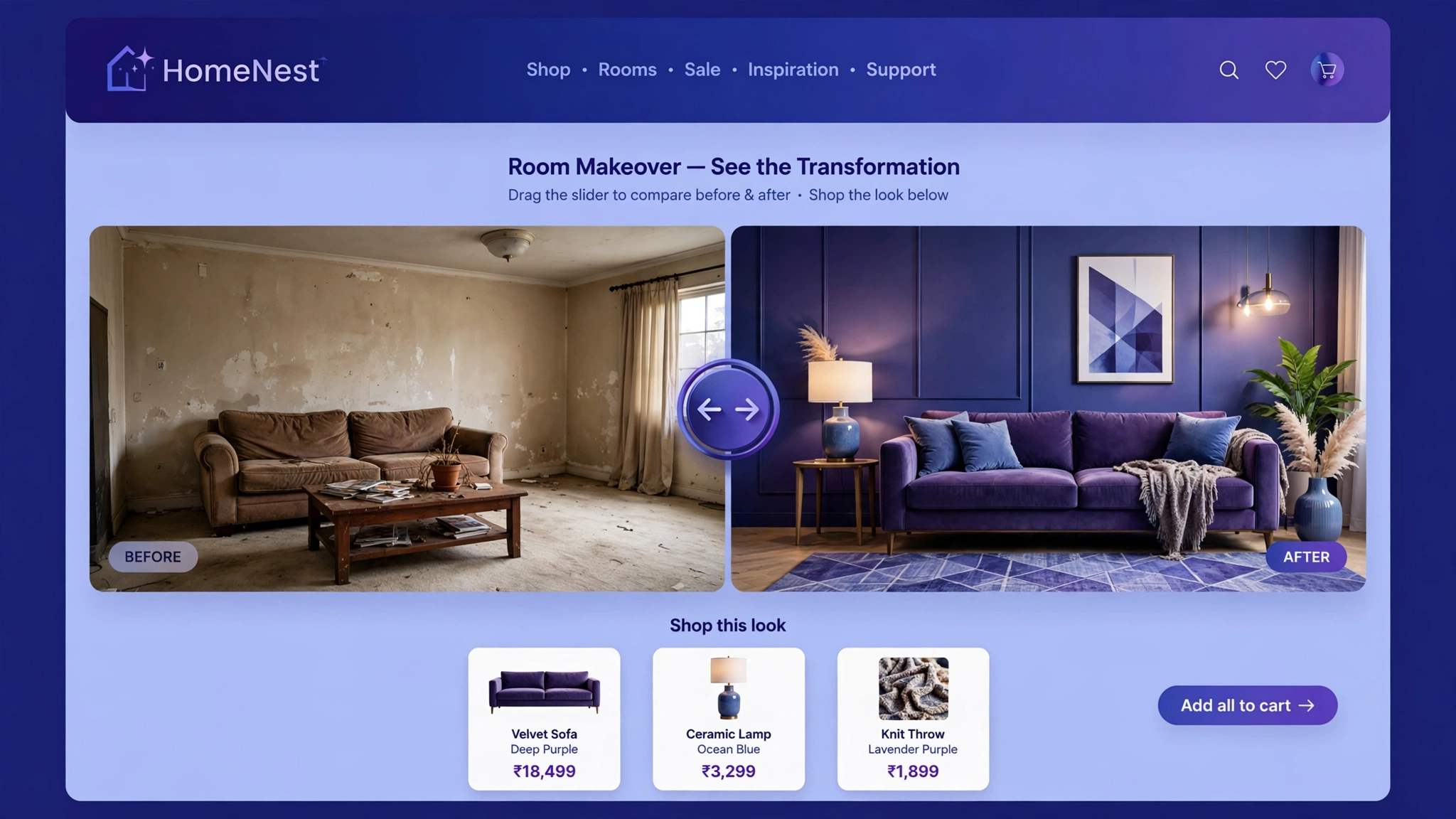
“Show, don’t tell” is the golden rule of selling transformations — and nothing shows like a draggable before/after slider. Skincare results, room makeovers, detailing jobs: let shoppers drag the handle themselves and the proof becomes undeniable. Interactive proof converts sceptics.
Below are 6 before/after slider styles, each rendering live — grab the handle and drag it! Then copy the code into a Custom Liquid section. It’s one tiny script, works on mobile (touch-friendly), and needs no app.
1. Beauty – Skincare Transformation
The money slider for skincare: ‘before’ dull skin vs ‘after’ glowing results. Shoppers drag the handle and feel the transformation — far more persuasive than any claim in your product description. Use real customer photos (with permission) for maximum trust. This single section can carry an entire results page.
Preview
AFTER
Drag the handle above ☝️ — see the glow-up.
Liquid Code
<div class="lk-ba1-wrap">
  <img class="lk-ba1-after" src="https://picsum.photos/seed/skinafter1/700/420" alt="After">
  <div class="lk-ba1-before" style="width:50%"><img src="https://picsum.photos/seed/skinbefore1/700/420" alt="Before"><span class="lk-ba1-tagb">BEFORE</span></div>
  <span class="lk-ba1-taga">AFTER</span>
  <input type="range" min="0" max="100" value="50" class="lk-ba1-slider" aria-label="Compare slider">
</div>
<style>
.lk-ba1-wrap{position:relative;max-width:700px;margin:0 auto;overflow:hidden;border-radius:14px;background:#f7f7f7}
.lk-ba1-wrap img{display:block;width:700px;max-width:none;height:420px;object-fit:cover}
.lk-ba1-after{width:100%}
.lk-ba1-before{position:absolute;top:0;left:0;height:100%;overflow:hidden}
.lk-ba1-before::after{content:'';position:absolute;top:0;right:-2px;width:4px;height:100%;background:#fff;box-shadow:0 0 10px rgba(0,0,0,.6);}
.lk-ba1-tagb,.lk-ba1-taga{position:absolute;top:14px;font-size:12px;font-weight:800;letter-spacing:1px;background:rgba(0,0,0,.65);color:#fff;padding:6px 12px;border-radius:20px;z-index:2}
.lk-ba1-tagb{left:14px}
.lk-ba1-taga{right:14px}
.lk-ba1-slider{position:absolute;top:0;left:0;width:100%;height:100%;opacity:0;cursor:ew-resize;margin:0;z-index:3}
</style>
<script>
document.querySelectorAll('.lk-ba1-slider').forEach(function(s){s.addEventListener('input',function(){this.parentElement.querySelector('.lk-ba1-before').style.width=this.value+'%';});});
</script>
2. Furniture – Room Makeover
Empty room vs styled room: the oldest trick in home decor, now interactive. Furniture shoppers can’t visualise — this does it for them. Drag from bare walls to your fully staged look and watch ‘maybe’ turn into ‘add to cart’. Perfect for bundles: show the room, sell every piece in it.
Preview
AFTER
Drag above ☝️ — from empty to stunning.
Liquid Code
<div class="lk-ba2-wrap">
  <img class="lk-ba2-after" src="https://picsum.photos/seed/roomafter1/700/420" alt="After">
  <div class="lk-ba2-before" style="width:50%"><img src="https://picsum.photos/seed/roombefore1/700/420" alt="Before"><span class="lk-ba2-tagb">BEFORE</span></div>
  <span class="lk-ba2-taga">AFTER</span>
  <input type="range" min="0" max="100" value="50" class="lk-ba2-slider" aria-label="Compare slider">
</div>
<style>
.lk-ba2-wrap{position:relative;max-width:700px;margin:0 auto;overflow:hidden;border-radius:14px;background:#efe9dd}
.lk-ba2-wrap img{display:block;width:700px;max-width:none;height:420px;object-fit:cover}
.lk-ba2-after{width:100%}
.lk-ba2-before{position:absolute;top:0;left:0;height:100%;overflow:hidden}
.lk-ba2-before::after{content:'';position:absolute;top:0;right:-2px;width:4px;height:100%;background:#fff;box-shadow:0 0 10px rgba(0,0,0,.6);}
.lk-ba2-tagb,.lk-ba2-taga{position:absolute;top:14px;font-size:12px;font-weight:800;letter-spacing:1px;background:rgba(0,0,0,.65);color:#fff;padding:6px 12px;border-radius:20px;z-index:2}
.lk-ba2-tagb{left:14px}
.lk-ba2-taga{right:14px}
.lk-ba2-slider{position:absolute;top:0;left:0;width:100%;height:100%;opacity:0;cursor:ew-resize;margin:0;z-index:3}
</style>
<script>
document.querySelectorAll('.lk-ba2-slider').forEach(function(s){s.addEventListener('input',function(){this.parentElement.querySelector('.lk-ba2-before').style.width=this.value+'%';});});
</script>
3. Fitness – Progress Comparison
Transformation photos are fitness marketing’s nuclear weapon — but static side-by-sides are easy to fake-sceptic. A draggable slider puts the proof literally in the visitor’s hands. They control the reveal, which makes the result feel verified. Use it for programs, supplements, and coaching offers.
Preview
DAY 90
Drag above ☝️ — 90 days of progress.
Liquid Code
<div class="lk-ba3-wrap">
  <img class="lk-ba3-after" src="https://picsum.photos/seed/fitafter1/700/420" alt="After">
  <div class="lk-ba3-before" style="width:50%"><img src="https://picsum.photos/seed/fitbefore1/700/420" alt="Before"><span class="lk-ba3-tagb">DAY 1</span></div>
  <span class="lk-ba3-taga">DAY 90</span>
  <input type="range" min="0" max="100" value="50" class="lk-ba3-slider" aria-label="Compare slider">
</div>
<style>
.lk-ba3-wrap{position:relative;max-width:700px;margin:0 auto;overflow:hidden;border-radius:14px;background:#111}
.lk-ba3-wrap img{display:block;width:700px;max-width:none;height:420px;object-fit:cover}
.lk-ba3-after{width:100%}
.lk-ba3-before{position:absolute;top:0;left:0;height:100%;overflow:hidden}
.lk-ba3-before::after{content:'';position:absolute;top:0;right:-2px;width:4px;height:100%;background:#fff;box-shadow:0 0 10px rgba(0,0,0,.6);}
.lk-ba3-tagb,.lk-ba3-taga{position:absolute;top:14px;font-size:12px;font-weight:800;letter-spacing:1px;background:rgba(0,0,0,.65);color:#fff;padding:6px 12px;border-radius:20px;z-index:2}
.lk-ba3-tagb{left:14px}
.lk-ba3-taga{right:14px}
.lk-ba3-slider{position:absolute;top:0;left:0;width:100%;height:100%;opacity:0;cursor:ew-resize;margin:0;z-index:3}
</style>
<script>
document.querySelectorAll('.lk-ba3-slider').forEach(function(s){s.addEventListener('input',function(){this.parentElement.querySelector('.lk-ba3-before').style.width=this.value+'%';});});
</script>
4. Car Detailing – Dirty vs Detailed
Nothing sells detailing like filth vs shine. The grime-to-gloss drag is viscerally satisfying — shoppers will play with it like a fidget toy, and every drag deepens their desire for that shine on their car. Ideal for detailing studios, ceramic coating brands, and car-care products.
Preview
DETAILED
Drag above ☝️ — oddly satisfying, right?
Liquid Code
<div class="lk-ba4-wrap">
  <img class="lk-ba4-after" src="https://picsum.photos/seed/carafter1/700/420" alt="After">
  <div class="lk-ba4-before" style="width:50%"><img src="https://picsum.photos/seed/carbefore1/700/420" alt="Before"><span class="lk-ba4-tagb">BEFORE</span></div>
  <span class="lk-ba4-taga">DETAILED</span>
  <input type="range" min="0" max="100" value="50" class="lk-ba4-slider" aria-label="Compare slider">
</div>
<style>
.lk-ba4-wrap{position:relative;max-width:700px;margin:0 auto;overflow:hidden;border-radius:14px;background:#1a1a1a}
.lk-ba4-wrap img{display:block;width:700px;max-width:none;height:420px;object-fit:cover}
.lk-ba4-after{width:100%}
.lk-ba4-before{position:absolute;top:0;left:0;height:100%;overflow:hidden}
.lk-ba4-before::after{content:'';position:absolute;top:0;right:-2px;width:4px;height:100%;background:#fff;box-shadow:0 0 10px rgba(0,0,0,.6);}
.lk-ba4-tagb,.lk-ba4-taga{position:absolute;top:14px;font-size:12px;font-weight:800;letter-spacing:1px;background:rgba(0,0,0,.65);color:#fff;padding:6px 12px;border-radius:20px;z-index:2}
.lk-ba4-tagb{left:14px}
.lk-ba4-taga{right:14px}
.lk-ba4-slider{position:absolute;top:0;left:0;width:100%;height:100%;opacity:0;cursor:ew-resize;margin:0;z-index:3}
</style>
<script>
document.querySelectorAll('.lk-ba4-slider').forEach(function(s){s.addEventListener('input',function(){this.parentElement.querySelector('.lk-ba4-before').style.width=this.value+'%';});});
</script>
5. Home Renovation – Before/After
Renovation is a high-ticket, high-anxiety purchase — proof crushes anxiety. Let prospects drag between ‘dated disaster’ and ‘dream kitchen’ to feel the value of your work. Contractors: put this on your homepage above the quote form and watch enquiries climb. The slider does your portfolio’s heavy lifting.
Preview
RENOVATED
Drag above ☝️ — renovation magic.
Liquid Code
<div class="lk-ba5-wrap">
  <img class="lk-ba5-after" src="https://picsum.photos/seed/renoafter1/700/420" alt="After">
  <div class="lk-ba5-before" style="width:50%"><img src="https://picsum.photos/seed/renobefore1/700/420" alt="Before"><span class="lk-ba5-tagb">OLD</span></div>
  <span class="lk-ba5-taga">RENOVATED</span>
  <input type="range" min="0" max="100" value="50" class="lk-ba5-slider" aria-label="Compare slider">
</div>
<style>
.lk-ba5-wrap{position:relative;max-width:700px;margin:0 auto;overflow:hidden;border-radius:14px;background:#f5f1e8}
.lk-ba5-wrap img{display:block;width:700px;max-width:none;height:420px;object-fit:cover}
.lk-ba5-after{width:100%}
.lk-ba5-before{position:absolute;top:0;left:0;height:100%;overflow:hidden}
.lk-ba5-before::after{content:'';position:absolute;top:0;right:-2px;width:4px;height:100%;background:#fff;box-shadow:0 0 10px rgba(0,0,0,.6);}
.lk-ba5-tagb,.lk-ba5-taga{position:absolute;top:14px;font-size:12px;font-weight:800;letter-spacing:1px;background:rgba(0,0,0,.65);color:#fff;padding:6px 12px;border-radius:20px;z-index:2}
.lk-ba5-tagb{left:14px}
.lk-ba5-taga{right:14px}
.lk-ba5-slider{position:absolute;top:0;left:0;width:100%;height:100%;opacity:0;cursor:ew-resize;margin:0;z-index:3}
</style>
<script>
document.querySelectorAll('.lk-ba5-slider').forEach(function(s){s.addEventListener('input',function(){this.parentElement.querySelector('.lk-ba5-before').style.width=this.value+'%';});});
</script>
6. Fashion – Day to Night Look
One outfit, two vibes: drag between the casual day look and the styled night look to show versatility. Fashion shoppers love cost-per-wear logic — this slider shows them two outfits for the price of one. Great for convertible pieces, accessories, and ‘desk to dinner’ collections.
Preview
NIGHT
Drag above ☝️ — day to night in one slide.
Liquid Code
<div class="lk-ba6-wrap">
  <img class="lk-ba6-after" src="https://picsum.photos/seed/fashionafter1/700/420" alt="After">
  <div class="lk-ba6-before" style="width:50%"><img src="https://picsum.photos/seed/fashionbefore1/700/420" alt="Before"><span class="lk-ba6-tagb">DAY</span></div>
  <span class="lk-ba6-taga">NIGHT</span>
  <input type="range" min="0" max="100" value="50" class="lk-ba6-slider" aria-label="Compare slider">
</div>
<style>
.lk-ba6-wrap{position:relative;max-width:700px;margin:0 auto;overflow:hidden;border-radius:14px;background:#fafafa}
.lk-ba6-wrap img{display:block;width:700px;max-width:none;height:420px;object-fit:cover}
.lk-ba6-after{width:100%}
.lk-ba6-before{position:absolute;top:0;left:0;height:100%;overflow:hidden}
.lk-ba6-before::after{content:'';position:absolute;top:0;right:-2px;width:4px;height:100%;background:#fff;box-shadow:0 0 10px rgba(0,0,0,.6);}
.lk-ba6-tagb,.lk-ba6-taga{position:absolute;top:14px;font-size:12px;font-weight:800;letter-spacing:1px;background:rgba(0,0,0,.65);color:#fff;padding:6px 12px;border-radius:20px;z-index:2}
.lk-ba6-tagb{left:14px}
.lk-ba6-taga{right:14px}
.lk-ba6-slider{position:absolute;top:0;left:0;width:100%;height:100%;opacity:0;cursor:ew-resize;margin:0;z-index:3}
</style>
<script>
document.querySelectorAll('.lk-ba6-slider').forEach(function(s){s.addEventListener('input',function(){this.parentElement.querySelector('.lk-ba6-before').style.width=this.value+'%';});});
</script>
How to Add Before & After Image Slider to Shopify
- From your Shopify admin, go to Online Store → Themes.
- Click Customize on your live (published) theme.
- In the theme editor sidebar, click Add section → Custom Liquid.
- Copy the code from any variation above and paste it into the Custom Liquid box.
- Drag the section where you want it on the homepage and click Save — done! No app needed.
Customize the Before & After Image Slider
- Use your own photos: replace the
picsum.photosURLs with your Shopify Files image URLs (Content → Files → copy link). - Change the labels: edit BEFORE/AFTER text to anything — ‘DAY 1 / DAY 90’, ‘DIRTY / CLEAN’, etc.
- Match your brand colours: the divider line is pure white — change it to your accent colour in the
::afterrule. - Adjust the starting position: change
value="50"andwidth:50%to start more revealed (try 30 or 70). - Keep both photos the same dimensions or the slider will look broken — 700×420 works great.
More Shopify Code Sections
- Shopify Image Hover Zoom Effect
- Shopify Product Image Hover Change
- Shopify Hero Banner Text Animation (Liquid + CSS)
- Shopify Video Background Hero Section
- Shopify Testimonial Auto Slider
- Shopify Before & After Image Slider
- Shopify Product Card Hover Effect
- Shopify Infinite Logo Carousel (No App)
Conclusion
A before/after slider turns passive scrolling into active discovery — and active shoppers buy more. Whether you’re selling skincare, sofas, or detailing services, letting visitors drag the proof themselves is the closest thing to a free trial. Grab the style that fits, swap in your real photos, and paste it into Custom Liquid. No app, five minutes, undeniable proof.
Want more copy-paste Shopify sections like this? Check out LayoutKart’s premium Shopify templates — professionally designed themes packed with conversion-boosting sections, ready to launch in minutes.
