
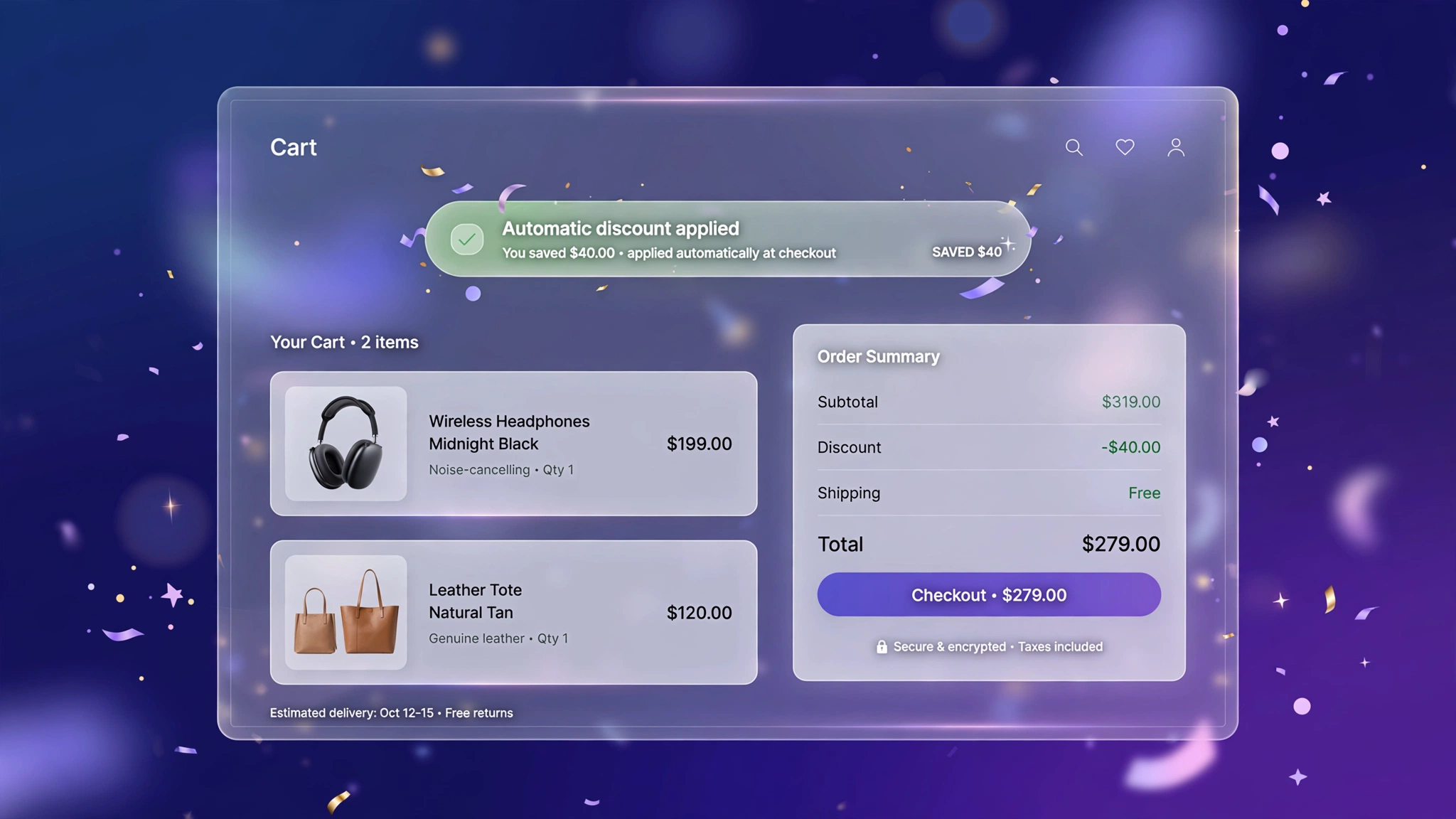
You set up an automatic discount — buy one get one, 10% off over ₹2,000, whatever. But here’s the catch: half your customers never notice it applied, so it doesn’t influence their decision at all. An automatic discount display banner fixes that by loudly celebrating the savings right in the cart: ‘You’ve saved ₹340 with FESTIVE10!’ That little dopamine hit makes shoppers feel smart — and smart shoppers complete checkout. These 6 banners read Shopify’s real discount objects, so they only appear when a discount genuinely applies. Paste one into a Custom Liquid section on the cart page and make every discount pull its weight.
1. Success – Green Celebration Banner
Classic green success banner — the universal color of ‘you saved money’. Works for every store, every sale.
Preview
−₹340
Sample: Appears only when a real discount applies — shows the code name and total saved.
Liquid Code
{% comment %} LayoutKart - Automatic Discount Display (Green Win) {% endcomment %}
{% assign disc_total = 0 %}
{% for d in cart.cart_level_discount_applications %}
  {% assign disc_total = disc_total | plus: d.total_allocated_amount %}
{% endfor %}
{% if disc_total > 0 %}
<style>
.lk-autodisc-e1{background:#f0fdf4;border:1px solid #86efac;border-radius:12px;padding:14px 18px;margin:18px 0;
display:flex;align-items:center;gap:14px;font-family:inherit;}
.lk-autodisc-e1 .lk-ic{font-size:26px;}
.lk-autodisc-e1 .lk-tx{color:#14532d;}
.lk-autodisc-e1 .lk-tx strong{font-size:16px;display:block;}
.lk-autodisc-e1 .lk-amt{margin-left:auto;font-size:22px;font-weight:800;color:#16a34a;white-space:nowrap;}
</style>
<div class="lk-autodisc-e1">
  <span class="lk-ic">🎉</span>
  <div class="lk-tx"><strong>Discount applied — nice shopping!</strong>
  <span style="font-size:13px;">
  {% for d in cart.cart_level_discount_applications %}{{ d.title }}{% unless forloop.last %}, {% endunless %}{% endfor %}
  applied to your order.</span></div>
  <span class="lk-amt">−{{ disc_total | money }}</span>
</div>
{% endif %}
2. Gold – Premium Gold Banner
Gold-on-ivory for luxury stores — savings framed as privilege, not penny-pinching.
Preview
−₹340
Sample: Appears only when a real discount applies — shows the code name and total saved.
Liquid Code
{% comment %} LayoutKart - Automatic Discount Display (Gold Privilege) {% endcomment %}
{% assign disc_total = 0 %}
{% for d in cart.cart_level_discount_applications %}
  {% assign disc_total = disc_total | plus: d.total_allocated_amount %}
{% endfor %}
{% if disc_total > 0 %}
<style>
.lk-autodisc-e2{background:#fffdf5;border:1px solid #d4af37;border-radius:10px;padding:14px 18px;margin:18px 0;
display:flex;align-items:center;gap:14px;font-family:inherit;}
.lk-autodisc-e2 .lk-ic{font-size:26px;}
.lk-autodisc-e2 .lk-tx{color:#713f12;}
.lk-autodisc-e2 .lk-tx strong{font-size:16px;display:block;}
.lk-autodisc-e2 .lk-amt{margin-left:auto;font-size:22px;font-weight:800;color:#b8860b;white-space:nowrap;}
</style>
<div class="lk-autodisc-e2">
  <span class="lk-ic">🎉</span>
  <div class="lk-tx"><strong>Exclusive savings applied to your order</strong>
  <span style="font-size:13px;">
  {% for d in cart.cart_level_discount_applications %}{{ d.title }}{% unless forloop.last %}, {% endunless %}{% endfor %}
  applied to your order.</span></div>
  <span class="lk-amt">−{{ disc_total | money }}</span>
</div>
{% endif %}
3. Minimal – Slim Savings Line
One quiet line under the cart total — for minimal brands that don’t do confetti.
Preview
−₹340
Sample: Appears only when a real discount applies — shows the code name and total saved.
Liquid Code
{% comment %} LayoutKart - Automatic Discount Display (Quiet Line) {% endcomment %}
{% assign disc_total = 0 %}
{% for d in cart.cart_level_discount_applications %}
  {% assign disc_total = disc_total | plus: d.total_allocated_amount %}
{% endfor %}
{% if disc_total > 0 %}
<style>
.lk-autodisc-e3{background:transparent;border:none;border-radius:4px;padding:14px 18px;margin:18px 0;
display:flex;align-items:center;gap:14px;font-family:inherit;}
.lk-autodisc-e3 .lk-ic{font-size:26px;}
.lk-autodisc-e3 .lk-tx{color:#374151;}
.lk-autodisc-e3 .lk-tx strong{font-size:16px;display:block;}
.lk-autodisc-e3 .lk-amt{margin-left:auto;font-size:22px;font-weight:800;color:#16a34a;white-space:nowrap;}
</style>
<div class="lk-autodisc-e3">
  <span class="lk-ic">🎉</span>
  <div class="lk-tx"><strong>You're saving on this order</strong>
  <span style="font-size:13px;">
  {% for d in cart.cart_level_discount_applications %}{{ d.title }}{% unless forloop.last %}, {% endunless %}{% endfor %}
  applied to your order.</span></div>
  <span class="lk-amt">−{{ disc_total | money }}</span>
</div>
{% endif %}
4. Bold – Promo Burst Banner
Loud and proud with a big savings number — built for clearance and festive campaigns.
Preview
−₹340
Sample: Appears only when a real discount applies — shows the code name and total saved.
Liquid Code
{% comment %} LayoutKart - Automatic Discount Display (Promo Burst) {% endcomment %}
{% assign disc_total = 0 %}
{% for d in cart.cart_level_discount_applications %}
  {% assign disc_total = disc_total | plus: d.total_allocated_amount %}
{% endfor %}
{% if disc_total > 0 %}
<style>
.lk-autodisc-e4{background:#fef2f2;border:2px solid #ef4444;border-radius:14px;padding:14px 18px;margin:18px 0;
display:flex;align-items:center;gap:14px;font-family:inherit;}
.lk-autodisc-e4 .lk-ic{font-size:26px;}
.lk-autodisc-e4 .lk-tx{color:#7f1d1d;}
.lk-autodisc-e4 .lk-tx strong{font-size:16px;display:block;}
.lk-autodisc-e4 .lk-amt{margin-left:auto;font-size:22px;font-weight:800;color:#dc2626;white-space:nowrap;}
</style>
<div class="lk-autodisc-e4">
  <span class="lk-ic">🎉</span>
  <div class="lk-tx"><strong>MEGA SAVINGS APPLIED!</strong>
  <span style="font-size:13px;">
  {% for d in cart.cart_level_discount_applications %}{{ d.title }}{% unless forloop.last %}, {% endunless %}{% endfor %}
  applied to your order.</span></div>
  <span class="lk-amt">−{{ disc_total | money }}</span>
</div>
{% endif %}
5. Dark – Midnight Card
Dark card with glowing green savings for tech and streetwear brands.
Preview
−₹340
Sample: Appears only when a real discount applies — shows the code name and total saved.
Liquid Code
{% comment %} LayoutKart - Automatic Discount Display (Neon Savings) {% endcomment %}
{% assign disc_total = 0 %}
{% for d in cart.cart_level_discount_applications %}
  {% assign disc_total = disc_total | plus: d.total_allocated_amount %}
{% endfor %}
{% if disc_total > 0 %}
<style>
.lk-autodisc-e5{background:#0f172a;border:1px solid #1e293b;border-radius:12px;padding:14px 18px;margin:18px 0;
display:flex;align-items:center;gap:14px;font-family:inherit;}
.lk-autodisc-e5 .lk-ic{font-size:26px;}
.lk-autodisc-e5 .lk-tx{color:#e2e8f0;}
.lk-autodisc-e5 .lk-tx strong{font-size:16px;display:block;}
.lk-autodisc-e5 .lk-amt{margin-left:auto;font-size:22px;font-weight:800;color:#22c55e;white-space:nowrap;}
</style>
<div class="lk-autodisc-e5">
  <span class="lk-ic">🎉</span>
  <div class="lk-tx"><strong>Discount locked in</strong>
  <span style="font-size:13px;">
  {% for d in cart.cart_level_discount_applications %}{{ d.title }}{% unless forloop.last %}, {% endunless %}{% endfor %}
  applied to your order.</span></div>
  <span class="lk-amt">−{{ disc_total | money }}</span>
</div>
{% endif %}
6. Gift – Gift Box Banner
Gift-themed banner for festive season — the discount feels like a present, not a promotion.
Preview
−₹340
Sample: Appears only when a real discount applies — shows the code name and total saved.
Liquid Code
{% comment %} LayoutKart - Automatic Discount Display (Festive Gift) {% endcomment %}
{% assign disc_total = 0 %}
{% for d in cart.cart_level_discount_applications %}
  {% assign disc_total = disc_total | plus: d.total_allocated_amount %}
{% endfor %}
{% if disc_total > 0 %}
<style>
.lk-autodisc-e6{background:#fff7ed;border:2px dashed #f59e0b;border-radius:16px;padding:14px 18px;margin:18px 0;
display:flex;align-items:center;gap:14px;font-family:inherit;}
.lk-autodisc-e6 .lk-ic{font-size:26px;}
.lk-autodisc-e6 .lk-tx{color:#7c2d12;}
.lk-autodisc-e6 .lk-tx strong{font-size:16px;display:block;}
.lk-autodisc-e6 .lk-amt{margin-left:auto;font-size:22px;font-weight:800;color:#d97706;white-space:nowrap;}
</style>
<div class="lk-autodisc-e6">
  <span class="lk-ic">🎉</span>
  <div class="lk-tx"><strong>🎁 A little gift applied to your cart!</strong>
  <span style="font-size:13px;">
  {% for d in cart.cart_level_discount_applications %}{{ d.title }}{% unless forloop.last %}, {% endunless %}{% endfor %}
  applied to your order.</span></div>
  <span class="lk-amt">−{{ disc_total | money }}</span>
</div>
{% endif %}
How to Add Automatic Discount Display to Shopify
No app needed — this works with a free built-in Shopify feature called the Custom Liquid section. It takes about two minutes:
- From your Shopify admin, go to Online Store → Themes.
- Click Customize next to your live theme (works with Dawn and all Online Store 2.0 themes).
- In the theme editor, use the top dropdown to navigate to your cart page (or product page for product-page effects).
- In the left sidebar, click Add section → Custom liquid.
- Delete the placeholder code, paste the code from your chosen variation above, and click Save.
- Preview your store — the effect is live instantly. Drag the section up or down to reposition it.
Tip: Always duplicate your theme first (Themes → … → Duplicate) so you have a backup before editing.
Customize the Automatic Discount Display
- Discount source: uses
cart.cart_level_discount_applications— works with automatic discounts and discount codes alike. - Empty state: when no discount applies, the banner hides itself completely (no awkward empty box).
- Total savings: sums all applied discounts so stacked offers show one satisfying number.
- Wording: change the headline to match your promo (‘Diwali Offer Applied!’ etc.).
More Shopify Code Sections
Keep customizing your store with these copy-paste tutorials:
- Shopify Discount Code Copy Button
- Shopify Cart Page Announcement Message
- Shopify Cart Free Shipping Progress Bar (Boost AOV)
- Shopify Animated Sale Announcement Bar
- Shopify Product Page Discount Banner
- Shopify Cart Drawer Custom Design with Liquid
- Shopify ‘Frequently Bought Together’ Section
- Shopify Countdown Announcement Bar
- Shopify Cart Upsell Section (You May Also Like)
Conclusion
Discounts you don’t advertise are discounts wasted. This banner makes sure every rupee you give away comes back as goodwill — and completed checkouts. Set up your automatic discount in Shopify admin, paste in the banner, and let your generosity be seen.
Want a store that already has all of this built in? Check out LayoutKart’s readymade Shopify sections and templates — premium designs, clean Liquid code, ready to install.
