
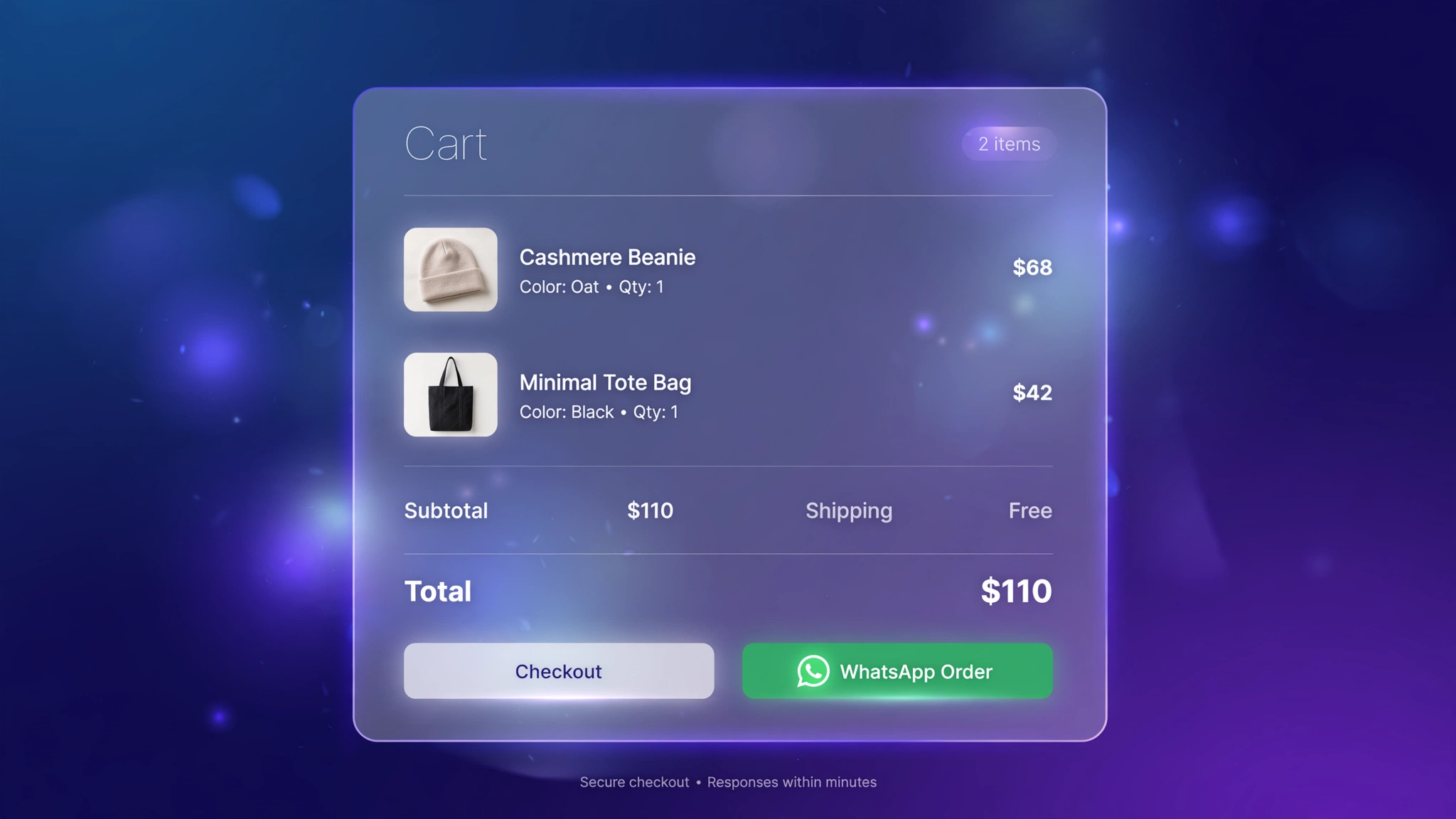
In India, a huge number of shoppers would rather chat than check out. They have questions, they want COD confirmation, they trust a human on WhatsApp more than a payment page. A WhatsApp checkout button meets them where they are — one tap opens a chat with their entire cart pre-typed as a message, ready to send. No app needed: it’s just a smart link built with Liquid. These 6 designs range from the classic green button to floating chat pills. Paste one into a Custom Liquid section on the cart page, add your number, and turn chats into orders.
1. Classic – Green WhatsApp Button
The instantly-recognizable green button — zero learning curve, every Indian shopper knows what it does.
Preview
COD available — pay at your doorstep
Sample: Opens WhatsApp with the cart items pre-typed — replace the demo number with yours.
Liquid Code
{% comment %} LayoutKart - WhatsApp Checkout Button (Classic Green) {% endcomment %}
{% capture wa_items %}{% for item in cart.items %}- {{ item.quantity }} x {{ item.title }} ({{ item.final_line_price | money }})%0A{% endfor %}{% endcapture %}
{% assign wa_msg = "Hello! I want to order from your store:%0A" | append: wa_items | append: "Total: " | append: cart.total_price | append: "%0AName: %0AAddress: " %}
<style>
.lk-wa-w1{display:flex;align-items:center;justify-content:center;gap:10px;max-width:520px;
margin:14px auto;padding:14px 20px;border-radius:12px;background:#25d366;color:#ffffff;
font-weight:700;font-size:16px;text-decoration:none;font-family:inherit;
box-shadow:0 8px 22px rgba(37,211,102,.35);transition:transform .15s;}
.lk-wa-w1:hover{transform:translateY(-2px);}
.lk-wa-w1 .lk-ic{font-size:22px;}
.lk-wa-note-w1{text-align:center;font-size:12px;opacity:.6;margin:6px 0 0;}
</style>
<a class="lk-wa-w1" href="https://wa.me/919800000000?text={{ wa_msg | url_encode }}" target="_blank" rel="noopener">
<span class="lk-ic">💬</span> Order on WhatsApp</a>
<p class="lk-wa-note-w1">COD available — pay at your doorstep</p>
2. Dark – Chat Dark Style
Dark chat-style button for modern brands — looks native next to a dark theme.
Preview
Typically replies within minutes
Sample: Opens WhatsApp with the cart items pre-typed — replace the demo number with yours.
Liquid Code
{% comment %} LayoutKart - WhatsApp Checkout Button (Dark Chat) {% endcomment %}
{% capture wa_items %}{% for item in cart.items %}- {{ item.quantity }} x {{ item.title }} ({{ item.final_line_price | money }})%0A{% endfor %}{% endcapture %}
{% assign wa_msg = "Hello! I want to order from your store:%0A" | append: wa_items | append: "Total: " | append: cart.total_price | append: "%0AName: %0AAddress: " %}
<style>
.lk-wa-w2{display:flex;align-items:center;justify-content:center;gap:10px;max-width:520px;
margin:14px auto;padding:14px 20px;border-radius:14px;background:#075e54;color:#ffffff;
font-weight:700;font-size:16px;text-decoration:none;font-family:inherit;
box-shadow:0 8px 22px rgba(37,211,102,.35);transition:transform .15s;}
.lk-wa-w2:hover{transform:translateY(-2px);}
.lk-wa-w2 .lk-ic{font-size:22px;}
.lk-wa-note-w2{text-align:center;font-size:12px;opacity:.6;margin:6px 0 0;}
</style>
<a class="lk-wa-w2" href="https://wa.me/919800000000?text={{ wa_msg | url_encode }}" target="_blank" rel="noopener">
<span class="lk-ic">💬</span> Chat & Order on WhatsApp</a>
<p class="lk-wa-note-w2">Typically replies within minutes</p>
3. Pill – Floating Pill Button
A floating pill that hovers near the checkout — friendly, unmissable, mobile-perfect.
Preview
Sample: Opens WhatsApp with the cart items pre-typed — replace the demo number with yours.
Liquid Code
{% comment %} LayoutKart - WhatsApp Checkout Button (Floating Pill) {% endcomment %}
{% capture wa_items %}{% for item in cart.items %}- {{ item.quantity }} x {{ item.title }} ({{ item.final_line_price | money }})%0A{% endfor %}{% endcapture %}
{% assign wa_msg = "Hello! I want to order from your store:%0A" | append: wa_items | append: "Total: " | append: cart.total_price | append: "%0AName: %0AAddress: " %}
<style>
.lk-wa-w3{display:flex;align-items:center;justify-content:center;gap:10px;max-width:520px;
margin:14px auto;padding:14px 20px;border-radius:99px;background:#25d366;color:#ffffff;
font-weight:700;font-size:16px;text-decoration:none;font-family:inherit;
box-shadow:0 8px 22px rgba(37,211,102,.35);transition:transform .15s;}
.lk-wa-w3:hover{transform:translateY(-2px);}
.lk-wa-w3 .lk-ic{font-size:22px;}
.lk-wa-note-w3{text-align:center;font-size:12px;opacity:.6;margin:6px 0 0;}
</style>
<a class="lk-wa-w3" href="https://wa.me/919800000000?text={{ wa_msg | url_encode }}" target="_blank" rel="noopener">
<span class="lk-ic">💬</span> WhatsApp Us to Order</a>
4. Outline – Minimal Outline Button
Subtle outlined button for minimal brands that find big green buttons a bit loud.
Preview
Sample: Opens WhatsApp with the cart items pre-typed — replace the demo number with yours.
Liquid Code
{% comment %} LayoutKart - WhatsApp Checkout Button (Minimal Outline) {% endcomment %}
{% capture wa_items %}{% for item in cart.items %}- {{ item.quantity }} x {{ item.title }} ({{ item.final_line_price | money }})%0A{% endfor %}{% endcapture %}
{% assign wa_msg = "Hello! I want to order from your store:%0A" | append: wa_items | append: "Total: " | append: cart.total_price | append: "%0AName: %0AAddress: " %}
<style>
.lk-wa-w4{display:flex;align-items:center;justify-content:center;gap:10px;max-width:520px;
margin:14px auto;padding:14px 20px;border-radius:10px;background:#ffffff;color:#128c4b;
font-weight:700;font-size:16px;text-decoration:none;font-family:inherit;
box-shadow:0 8px 22px rgba(37,211,102,.35);transition:transform .15s;}
.lk-wa-w4:hover{transform:translateY(-2px);}
.lk-wa-w4 .lk-ic{font-size:22px;}
.lk-wa-note-w4{text-align:center;font-size:12px;opacity:.6;margin:6px 0 0;}
</style>
<a class="lk-wa-w4" href="https://wa.me/919800000000?text={{ wa_msg | url_encode }}" target="_blank" rel="noopener">
<span class="lk-ic">💬</span> Order via WhatsApp</a>
5. Banner – Bold Banner Button
Full-width bold banner with order summary tease — maximum visibility on the cart page.
Preview
Send your cart as a message — we confirm on chat
Sample: Opens WhatsApp with the cart items pre-typed — replace the demo number with yours.
Liquid Code
{% comment %} LayoutKart - WhatsApp Checkout Button (Bold Banner) {% endcomment %}
{% capture wa_items %}{% for item in cart.items %}- {{ item.quantity }} x {{ item.title }} ({{ item.final_line_price | money }})%0A{% endfor %}{% endcapture %}
{% assign wa_msg = "Hello! I want to order from your store:%0A" | append: wa_items | append: "Total: " | append: cart.total_price | append: "%0AName: %0AAddress: " %}
<style>
.lk-wa-w5{display:flex;align-items:center;justify-content:center;gap:10px;max-width:520px;
margin:14px auto;padding:14px 20px;border-radius:8px;background:#128c4b;color:#ffffff;
font-weight:700;font-size:16px;text-decoration:none;font-family:inherit;
box-shadow:0 8px 22px rgba(37,211,102,.35);transition:transform .15s;}
.lk-wa-w5:hover{transform:translateY(-2px);}
.lk-wa-w5 .lk-ic{font-size:22px;}
.lk-wa-note-w5{text-align:center;font-size:12px;opacity:.6;margin:6px 0 0;}
</style>
<a class="lk-wa-w5" href="https://wa.me/919800000000?text={{ wa_msg | url_encode }}" target="_blank" rel="noopener">
<span class="lk-ic">💬</span> SEND ORDER ON WHATSAPP</a>
<p class="lk-wa-note-w5">Send your cart as a message — we confirm on chat</p>
6. COD – COD Special Button
Built for COD-heavy stores — the note reassures cash-on-delivery shoppers right under the button.
Preview
✓ Cash on Delivery available ✓ No advance needed
Sample: Opens WhatsApp with the cart items pre-typed — replace the demo number with yours.
Liquid Code
{% comment %} LayoutKart - WhatsApp Checkout Button (COD Special) {% endcomment %}
{% capture wa_items %}{% for item in cart.items %}- {{ item.quantity }} x {{ item.title }} ({{ item.final_line_price | money }})%0A{% endfor %}{% endcapture %}
{% assign wa_msg = "Hello! I want to order from your store:%0A" | append: wa_items | append: "Total: " | append: cart.total_price | append: "%0AName: %0AAddress: " %}
<style>
.lk-wa-w6{display:flex;align-items:center;justify-content:center;gap:10px;max-width:520px;
margin:14px auto;padding:14px 20px;border-radius:12px;background:#25d366;color:#ffffff;
font-weight:700;font-size:16px;text-decoration:none;font-family:inherit;
box-shadow:0 8px 22px rgba(37,211,102,.35);transition:transform .15s;}
.lk-wa-w6:hover{transform:translateY(-2px);}
.lk-wa-w6 .lk-ic{font-size:22px;}
.lk-wa-note-w6{text-align:center;font-size:12px;opacity:.6;margin:6px 0 0;}
</style>
<a class="lk-wa-w6" href="https://wa.me/919800000000?text={{ wa_msg | url_encode }}" target="_blank" rel="noopener">
<span class="lk-ic">💬</span> Order on WhatsApp (COD)</a>
<p class="lk-wa-note-w6">✓ Cash on Delivery available ✓ No advance needed</p>
How to Add WhatsApp Checkout Button to Shopify
No app needed — this works with a free built-in Shopify feature called the Custom Liquid section. It takes about two minutes:
- From your Shopify admin, go to Online Store → Themes.
- Click Customize next to your live theme (works with Dawn and all Online Store 2.0 themes).
- In the theme editor, use the top dropdown to navigate to your cart page (or product page for product-page effects).
- In the left sidebar, click Add section → Custom liquid.
- Delete the placeholder code, paste the code from your chosen variation above, and click Save.
- Preview your store — the effect is live instantly. Drag the section up or down to reposition it.
Tip: Always duplicate your theme first (Themes → … → Duplicate) so you have a backup before editing.
Customize the WhatsApp Checkout Button
- Your number: replace
919800000000with your WhatsApp Business number in full international format (no +, no spaces). - Message: edit the pre-filled text — keep the item list loop so every order arrives itemized.
- Placement: cart page converts best; also try it in the cart drawer and on product pages.
- COD note: variations include an optional ‘COD available’ line — keep it only if you offer COD.
More Shopify Code Sections
Keep customizing your store with these copy-paste tutorials:
- Shopify Product Page Custom WhatsApp Button
- Shopify Cart Drawer Custom Design with Liquid
- Shopify Sticky Add to Cart Bar
- Shopify Cart Page Announcement Message
- Shopify ‘Frequently Bought Together’ Section
- Shopify Discount Code Copy Button
- Shopify Cart Free Shipping Progress Bar (Boost AOV)
- Shopify Testimonial Auto Slider
- Shopify Liquid Typing Text Effect
Conclusion
For Indian stores especially, WhatsApp isn’t a nice-to-have — it’s where the sale actually happens. This button removes every step between ‘I want this’ and a conversation with you. Add your number, pick a style, and watch the ‘hi, is this available?’ messages turn into paid orders.
Want a store that already has all of this built in? Check out LayoutKart’s readymade Shopify sections and templates — premium designs, clean Liquid code, ready to install.
