
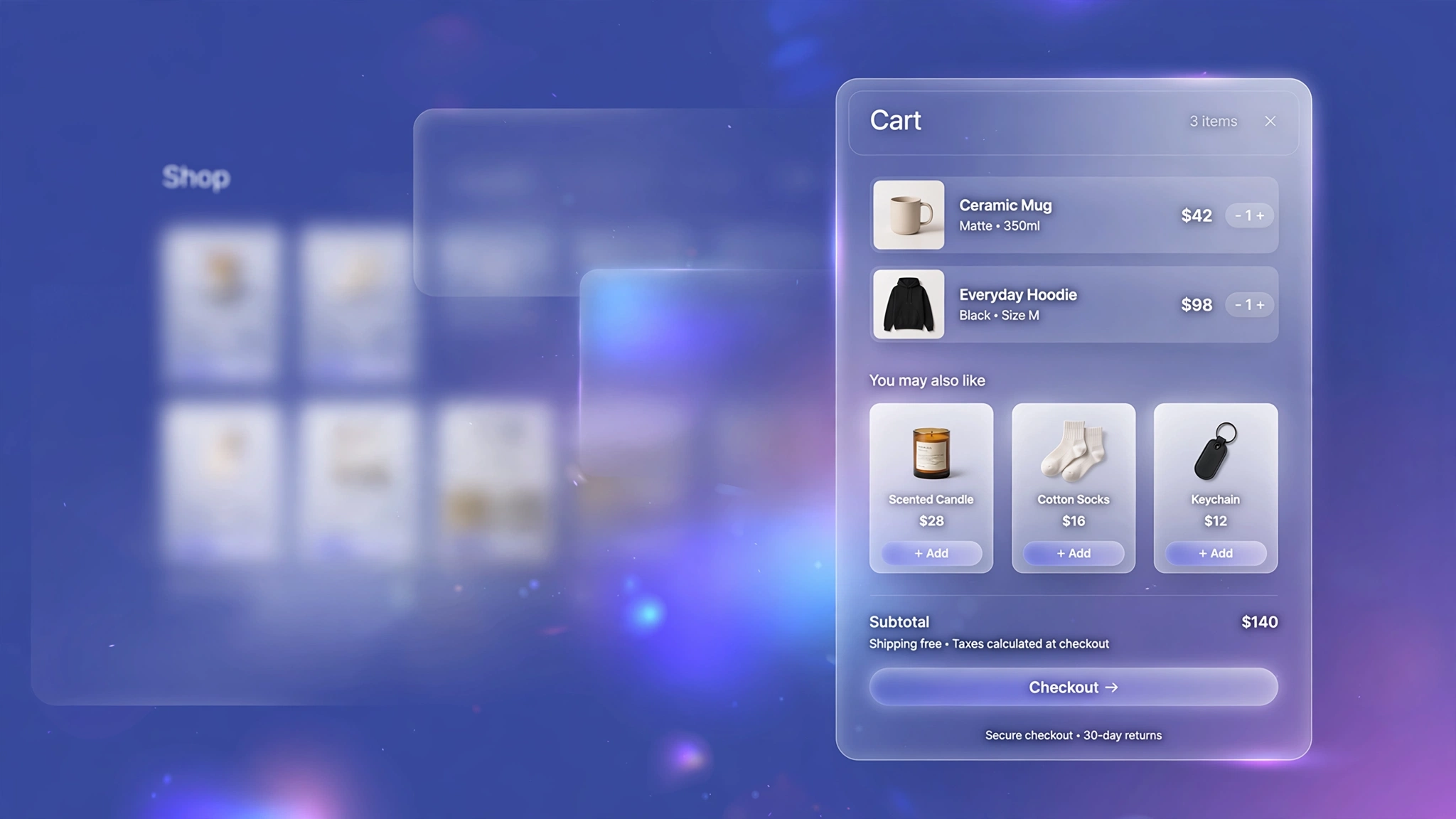
The customer has already decided to buy — that is the single best moment to suggest one more item. A ‘You May Also Like’ upsell section inside the cart turns single-item orders into multi-item orders, and it costs you nothing but a little Liquid. These 6 layouts cover every store style, from minimal text links to bold sale cards. They pull products from any collection you choose and add them via AJAX, so the shopper never leaves the cart. Pick your layout, paste it into a Custom Liquid section on the cart page, and let the upsells run themselves.
1. Grid – 4-Column Grid
The classic — four neat product cards in a row. Works everywhere, especially fashion and beauty stores with strong product photography.
Preview
You May Also Like
Sample Product
₹499
Sample Product
₹499
Sample Product
₹499
Sample: Four product cards pull from your chosen collection — items already in the cart are skipped automatically.
Liquid Code
{% comment %} LayoutKart - Cart Upsell (Classic Grid) {% endcomment %}
<style>
.lk-upsell-g1{margin:24px 0;}
.lk-upsell-g1 h3{font-size:18px;margin:0 0 14px;}
.lk-upsell-g1 .lk-grid{display:grid;grid-template-columns:repeat(4,1fr);gap:14px;}
.lk-upsell-g1 .lk-card{background:#fff;border:1px solid #eee;border-radius:12px;padding:10px;}
.lk-upsell-g1 .lk-card img{width:100%;aspect-ratio:1;object-fit:cover;border-radius:8px;}
.lk-upsell-g1 .lk-card .lk-t{font-size:14px;font-weight:600;margin:8px 0 2px;}
.lk-upsell-g1 .lk-card .lk-p{font-size:14px;margin:0 0 8px;}
.lk-upsell-g1 .lk-add{width:100%;padding:10px;border:none;border-radius:8px;cursor:pointer;background:#111;color:#fff;font-weight:600;}
.lk-upsell-g1 .lk-add.added{opacity:.6;pointer-events:none;}
</style>
<div class="lk-upsell-g1">
  <h3>You May Also Like</h3>
  <div class="lk-grid">
  {% assign shown = 0 %}
  {% for product in collections['upsell'].products %}
    {% assign in_cart = false %}
    {% for item in cart.items %}{% if item.product_id == product.id %}{% assign in_cart = true %}{% endif %}{% endfor %}
    {% unless in_cart %}{% assign shown = shown | plus: 1 %}
    {% if shown <= 4 %}
    <div class="lk-card">
      <img src="{{ product.featured_image | image_url: width: 400 }}" alt="{{ product.title | escape }}" loading="lazy">
      <p class="lk-t">{{ product.title }}</p>
      <p class="lk-p">{{ product.price | money }}</p>
      <button class="lk-add" data-variant="{{ product.selected_or_first_available_variant.id }}" onclick="lkUpsellAddg1(this)">Add +</button>
    </div>
    {% endif %}{% endunless %}
  {% endfor %}
  </div>
</div>
<script>
function lkUpsellAddg1(btn){
var id = btn.getAttribute('data-variant');
btn.textContent = 'Adding...';
fetch('/cart/add.js',{method:'POST',headers:{'Content-Type':'application/json'},
body:JSON.stringify({id:id,quantity:1})})
.then(r=>r.json()).then(()=>{btn.textContent='Added ✓';btn.classList.add('added');})
.catch(()=>{btn.textContent='Try again';});}
</script>
2. Slider – Horizontal Scroll Row
A swipeable row for mobile-first stores — shoppers flick through suggestions without the page getting longer.
Preview
Pairs Well With
Sample Product
₹499
Sample Product
₹499
Sample Product
₹499
Sample: Shoppers swipe sideways through suggestions; the row never makes the page longer.
Liquid Code
{% comment %} LayoutKart - Cart Upsell (Swipe Row) {% endcomment %}
<style>
.lk-upsell-g2{margin:24px 0;}
.lk-upsell-g2 h3{font-size:18px;margin:0 0 14px;}
.lk-upsell-g2 .lk-grid{display:flex;gap:14px;overflow-x:auto;padding-bottom:8px;}
.lk-upsell-g2 .lk-card{background:#fff;border:1px solid #eee;border-radius:12px;padding:10px;min-width:170px;}
.lk-upsell-g2 .lk-card img{width:100%;aspect-ratio:1;object-fit:cover;border-radius:8px;}
.lk-upsell-g2 .lk-card .lk-t{font-size:14px;font-weight:600;margin:8px 0 2px;}
.lk-upsell-g2 .lk-card .lk-p{font-size:14px;margin:0 0 8px;}
.lk-upsell-g2 .lk-add{width:100%;padding:10px;border:none;border-radius:8px;cursor:pointer;background:#111;color:#fff;font-weight:600;}
.lk-upsell-g2 .lk-add.added{opacity:.6;pointer-events:none;}
</style>
<div class="lk-upsell-g2">
  <h3>Pairs Well With</h3>
  <div class="lk-grid">
  {% assign shown = 0 %}
  {% for product in collections['upsell'].products %}
    {% assign in_cart = false %}
    {% for item in cart.items %}{% if item.product_id == product.id %}{% assign in_cart = true %}{% endif %}{% endfor %}
    {% unless in_cart %}{% assign shown = shown | plus: 1 %}
    {% if shown <= 4 %}
    <div class="lk-card">
      <img src="{{ product.featured_image | image_url: width: 400 }}" alt="{{ product.title | escape }}" loading="lazy">
      <p class="lk-t">{{ product.title }}</p>
      <p class="lk-p">{{ product.price | money }}</p>
      <button class="lk-add" data-variant="{{ product.selected_or_first_available_variant.id }}" onclick="lkUpsellAddg2(this)">Add +</button>
    </div>
    {% endif %}{% endunless %}
  {% endfor %}
  </div>
</div>
<script>
function lkUpsellAddg2(btn){
var id = btn.getAttribute('data-variant');
btn.textContent = 'Adding...';
fetch('/cart/add.js',{method:'POST',headers:{'Content-Type':'application/json'},
body:JSON.stringify({id:id,quantity:1})})
.then(r=>r.json()).then(()=>{btn.textContent='Added ✓';btn.classList.add('added');})
.catch(()=>{btn.textContent='Try again';});}
</script>
3. List – Compact List Rows
Space-saving horizontal rows with thumbnail left, details right. Ideal for electronics where specs matter more than big photos.
Preview
Frequently Added Together
Sample Product
₹499
Sample Product
₹499
Sample Product
₹499
Sample: Compact rows show thumbnail, title and price — specs stay readable on small screens.
Liquid Code
{% comment %} LayoutKart - Cart Upsell (Compact List) {% endcomment %}
<style>
.lk-upsell-g3{margin:24px 0;}
.lk-upsell-g3 h3{font-size:18px;margin:0 0 14px;}
.lk-upsell-g3 .lk-grid{display:grid;gap:10px;}
.lk-upsell-g3 .lk-card{display:flex;gap:12px;align-items:center;background:#f8f9fa;border-radius:10px;padding:8px 12px;}
.lk-upsell-g3 .lk-card img{width:100%;aspect-ratio:1;object-fit:cover;border-radius:8px;}
.lk-upsell-g3 .lk-card .lk-t{font-size:14px;font-weight:600;margin:8px 0 2px;}
.lk-upsell-g3 .lk-card .lk-p{font-size:14px;margin:0 0 8px;}
.lk-upsell-g3 .lk-add{width:100%;padding:10px;border:none;border-radius:8px;cursor:pointer;background:#0d6efd;color:#fff;font-weight:600;}
.lk-upsell-g3 .lk-add.added{opacity:.6;pointer-events:none;}
</style>
<div class="lk-upsell-g3">
  <h3>Frequently Added Together</h3>
  <div class="lk-grid">
  {% assign shown = 0 %}
  {% for product in collections['upsell'].products %}
    {% assign in_cart = false %}
    {% for item in cart.items %}{% if item.product_id == product.id %}{% assign in_cart = true %}{% endif %}{% endfor %}
    {% unless in_cart %}{% assign shown = shown | plus: 1 %}
    {% if shown <= 4 %}
    <div class="lk-card">
      <img src="{{ product.featured_image | image_url: width: 400 }}" alt="{{ product.title | escape }}" loading="lazy">
      <p class="lk-t">{{ product.title }}</p>
      <p class="lk-p">{{ product.price | money }}</p>
      <button class="lk-add" data-variant="{{ product.selected_or_first_available_variant.id }}" onclick="lkUpsellAddg3(this)">Add +</button>
    </div>
    {% endif %}{% endunless %}
  {% endfor %}
  </div>
</div>
<script>
function lkUpsellAddg3(btn){
var id = btn.getAttribute('data-variant');
btn.textContent = 'Adding...';
fetch('/cart/add.js',{method:'POST',headers:{'Content-Type':'application/json'},
body:JSON.stringify({id:id,quantity:1})})
.then(r=>r.json()).then(()=>{btn.textContent='Added ✓';btn.classList.add('added');})
.catch(()=>{btn.textContent='Try again';});}
</script>
4. Cards – Image-Left Feature Cards
Larger cards with the image on the left — great for home decor and lifestyle stores where the visual sells the add-on.
Preview
Complete the Look
Sample Product
₹499
Sample Product
₹499
Sample Product
₹499
Sample: Two roomy feature cards per row let lifestyle imagery do the selling.
Liquid Code
{% comment %} LayoutKart - Cart Upsell (Feature Cards) {% endcomment %}
<style>
.lk-upsell-g4{margin:24px 0;}
.lk-upsell-g4 h3{font-size:18px;margin:0 0 14px;}
.lk-upsell-g4 .lk-grid{display:grid;grid-template-columns:repeat(2,1fr);gap:14px;}
.lk-upsell-g4 .lk-card{display:flex;gap:14px;background:#fff;border:1px solid #eee;border-radius:14px;padding:12px;}
.lk-upsell-g4 .lk-card img{width:100%;aspect-ratio:1;object-fit:cover;border-radius:8px;}
.lk-upsell-g4 .lk-card .lk-t{font-size:14px;font-weight:600;margin:8px 0 2px;}
.lk-upsell-g4 .lk-card .lk-p{font-size:14px;margin:0 0 8px;}
.lk-upsell-g4 .lk-add{width:100%;padding:10px;border:none;border-radius:8px;cursor:pointer;background:#7c3aed;color:#fff;font-weight:600;}
.lk-upsell-g4 .lk-add.added{opacity:.6;pointer-events:none;}
</style>
<div class="lk-upsell-g4">
  <h3>Complete the Look</h3>
  <div class="lk-grid">
  {% assign shown = 0 %}
  {% for product in collections['upsell'].products %}
    {% assign in_cart = false %}
    {% for item in cart.items %}{% if item.product_id == product.id %}{% assign in_cart = true %}{% endif %}{% endfor %}
    {% unless in_cart %}{% assign shown = shown | plus: 1 %}
    {% if shown <= 4 %}
    <div class="lk-card">
      <img src="{{ product.featured_image | image_url: width: 400 }}" alt="{{ product.title | escape }}" loading="lazy">
      <p class="lk-t">{{ product.title }}</p>
      <p class="lk-p">{{ product.price | money }}</p>
      <button class="lk-add" data-variant="{{ product.selected_or_first_available_variant.id }}" onclick="lkUpsellAddg4(this)">Add +</button>
    </div>
    {% endif %}{% endunless %}
  {% endfor %}
  </div>
</div>
<script>
function lkUpsellAddg4(btn){
var id = btn.getAttribute('data-variant');
btn.textContent = 'Adding...';
fetch('/cart/add.js',{method:'POST',headers:{'Content-Type':'application/json'},
body:JSON.stringify({id:id,quantity:1})})
.then(r=>r.json()).then(()=>{btn.textContent='Added ✓';btn.classList.add('added');})
.catch(()=>{btn.textContent='Try again';});}
</script>
5. Minimal – Text-Only Links
No images, just elegant text rows — for luxury minimal brands where photography-heavy upsells would cheapen the feel.
Preview
You May Also Like
Sample Product
₹499
Sample Product
₹499
Sample Product
₹499
Sample: Understated text rows with prices — upsells without visual noise.
Liquid Code
{% comment %} LayoutKart - Cart Upsell (Text Links) {% endcomment %}
<style>
.lk-upsell-g5{margin:24px 0;}
.lk-upsell-g5 h3{font-size:18px;margin:0 0 14px;}
.lk-upsell-g5 .lk-grid{display:grid;gap:0;border-top:1px solid #eee;}
.lk-upsell-g5 .lk-card{display:flex;justify-content:space-between;align-items:center;padding:12px 4px;border-bottom:1px solid #eee;background:none;border-left:none;border-right:none;border-top:none;}
.lk-upsell-g5 .lk-card img{width:100%;aspect-ratio:1;object-fit:cover;border-radius:8px;}
.lk-upsell-g5 .lk-card .lk-t{font-size:14px;font-weight:600;margin:8px 0 2px;}
.lk-upsell-g5 .lk-card .lk-p{font-size:14px;margin:0 0 8px;}
.lk-upsell-g5 .lk-add{width:100%;padding:10px;border:none;border-radius:8px;cursor:pointer;background:none;border:1px solid #111;color:#111;padding:8px 16px;}
.lk-upsell-g5 .lk-add.added{opacity:.6;pointer-events:none;}
</style>
<div class="lk-upsell-g5">
  <h3>You May Also Like</h3>
  <div class="lk-grid">
  {% assign shown = 0 %}
  {% for product in collections['upsell'].products %}
    {% assign in_cart = false %}
    {% for item in cart.items %}{% if item.product_id == product.id %}{% assign in_cart = true %}{% endif %}{% endfor %}
    {% unless in_cart %}{% assign shown = shown | plus: 1 %}
    {% if shown <= 4 %}
    <div class="lk-card">
      <img src="{{ product.featured_image | image_url: width: 400 }}" alt="{{ product.title | escape }}" loading="lazy">
      <p class="lk-t">{{ product.title }}</p>
      <p class="lk-p">{{ product.price | money }}</p>
      <button class="lk-add" data-variant="{{ product.selected_or_first_available_variant.id }}" onclick="lkUpsellAddg5(this)">Add +</button>
    </div>
    {% endif %}{% endunless %}
  {% endfor %}
  </div>
</div>
<script>
function lkUpsellAddg5(btn){
var id = btn.getAttribute('data-variant');
btn.textContent = 'Adding...';
fetch('/cart/add.js',{method:'POST',headers:{'Content-Type':'application/json'},
body:JSON.stringify({id:id,quantity:1})})
.then(r=>r.json()).then(()=>{btn.textContent='Added ✓';btn.classList.add('added');})
.catch(()=>{btn.textContent='Try again';});}
</script>
6. Sale – Bold Discount Cards
High-energy cards with sale styling — perfect for pushing slow-moving stock as impulse add-ons during sale season.
Preview
Grab These Deals Too
Sample Product
₹499
Sample Product
₹499
Sample Product
₹499
Sample: Dashed sale-style cards create urgency around discounted add-ons.
Liquid Code
{% comment %} LayoutKart - Cart Upsell (Sale Cards) {% endcomment %}
<style>
.lk-upsell-g6{margin:24px 0;}
.lk-upsell-g6 h3{font-size:18px;margin:0 0 14px;}
.lk-upsell-g6 .lk-grid{display:grid;grid-template-columns:repeat(4,1fr);gap:14px;}
.lk-upsell-g6 .lk-card{background:#fff7ed;border:2px dashed #ea580c;border-radius:12px;padding:10px;}
.lk-upsell-g6 .lk-card img{width:100%;aspect-ratio:1;object-fit:cover;border-radius:8px;}
.lk-upsell-g6 .lk-card .lk-t{font-size:14px;font-weight:600;margin:8px 0 2px;}
.lk-upsell-g6 .lk-card .lk-p{font-size:14px;margin:0 0 8px;}
.lk-upsell-g6 .lk-add{width:100%;padding:10px;border:none;border-radius:8px;cursor:pointer;background:#ea580c;color:#fff;font-weight:700;}
.lk-upsell-g6 .lk-add.added{opacity:.6;pointer-events:none;}
</style>
<div class="lk-upsell-g6">
  <h3>Grab These Deals Too</h3>
  <div class="lk-grid">
  {% assign shown = 0 %}
  {% for product in collections['upsell'].products %}
    {% assign in_cart = false %}
    {% for item in cart.items %}{% if item.product_id == product.id %}{% assign in_cart = true %}{% endif %}{% endfor %}
    {% unless in_cart %}{% assign shown = shown | plus: 1 %}
    {% if shown <= 4 %}
    <div class="lk-card">
      <img src="{{ product.featured_image | image_url: width: 400 }}" alt="{{ product.title | escape }}" loading="lazy">
      <p class="lk-t">{{ product.title }}</p>
      <p class="lk-p">{{ product.price | money }}</p>
      <button class="lk-add" data-variant="{{ product.selected_or_first_available_variant.id }}" onclick="lkUpsellAddg6(this)">Add +</button>
    </div>
    {% endif %}{% endunless %}
  {% endfor %}
  </div>
</div>
<script>
function lkUpsellAddg6(btn){
var id = btn.getAttribute('data-variant');
btn.textContent = 'Adding...';
fetch('/cart/add.js',{method:'POST',headers:{'Content-Type':'application/json'},
body:JSON.stringify({id:id,quantity:1})})
.then(r=>r.json()).then(()=>{btn.textContent='Added ✓';btn.classList.add('added');})
.catch(()=>{btn.textContent='Try again';});}
</script>
How to Add Cart Upsell Section to Shopify
No app needed — this works with a free built-in Shopify feature called the Custom Liquid section. It takes about two minutes:
- From your Shopify admin, go to Online Store → Themes.
- Click Customize next to your live theme (works with Dawn and all Online Store 2.0 themes).
- In the theme editor, use the top dropdown to navigate to your cart page (or product page for product-page effects).
- In the left sidebar, click Add section → Custom liquid.
- Delete the placeholder code, paste the code from your chosen variation above, and click Save.
- Preview your store — the effect is live instantly. Drag the section up or down to reposition it.
Tip: Always duplicate your theme first (Themes → … → Duplicate) so you have a backup before editing.
Customize the Cart Upsell Section
- Products: replace
collections['upsell']with your own collection handle (e.g.collections['accessories']). - Count: change
limit: 4to show more or fewer products. - Exclude cart items: the snippet skips products already in the cart — keep that logic so you never recommend duplicates.
- Heading: rewrite ‘You May Also Like’ to match your brand voice (‘Pairs well with’, ‘Complete the look’).
More Shopify Code Sections
Keep customizing your store with these copy-paste tutorials:
- Shopify ‘Frequently Bought Together’ Section
- Shopify Cart Free Shipping Progress Bar (Boost AOV)
- Shopify Cart Drawer Custom Design with Liquid
- Shopify Product Page Custom Offer Box
- Shopify Cart Page Announcement Message
- Shopify Discount Code Copy Button
- Shopify Sticky Add to Cart Bar
- Shopify Product Card Quick View Button
- Shopify Collection Page Custom Filter Design
Conclusion
Upsells work because they meet the customer at peak buying intent. A simple ‘You May Also Like’ row can lift average order value by 10–30% with zero ad spend. Choose the layout that fits your theme, point it at the right collection, and let every cart do a little extra selling for you.
Want a store that already has all of this built in? Check out LayoutKart’s readymade Shopify sections and templates — premium designs, clean Liquid code, ready to install.
